Introduction
Android Componets
UserInterface
Advanced UI
Data Storage
Advanced Concepts
Others
New Studio
Android SQLite Database
Registration Query
    public long addRegistration(String name, String user_name, String pwd, String number,String email) {

        SQLiteDatabase db = this.getWritableDatabase();

        ContentValues values = new ContentValues();
        values.put(KEY_NAME, name);
        values.put(KEY_UNAME, user_name);
        values.put(KEY_PASSWORD, pwd);
        values.put(KEY_PHONE, number);
        values.put(KEY_EMAIL, email);
        // Inserting Row
        long a = db.insert(TABLE_REGISTRATION, null, values);
        db.close(); // Closing database connection
        return a;
    }
Login Query
    public boolean isLoin(String mUserName,String mPwd) {
        boolean fg=false;
        String selectQuery = "SELECT "+KEY_UNAME+" FROM "+TABLE_REGISTRATION+" WHERE username='"+mUserName+"' and "+KEY_PASSWORD+"='"+mPwd+"';";
        SQLiteDatabase db = this.getWritableDatabase();
        Cursor cursor = db.rawQuery(selectQuery, null);
         if(cursor.getCount()>0)
          {
             fg=true;
          }
        cursor.close();
        return fg;
    }
Android SQLite Database
- Android provides several ways to store user and app data.
- SQLite is a opensource SQL database that stores data.
- SQLite is a very light weight database which comes with Android OS.
- SQLite supports all the relational database features.
- android.database.sqlite package contains the classes to manage your own databases.
SQLiteOpenHelper class
- The android.database.sqlite.SQLiteOpenHelper class is used for database creation.
- For performing any database operation, you have to provide the implementation of onCreate() and onUpgrade() methods of SQLiteOpenHelper class.
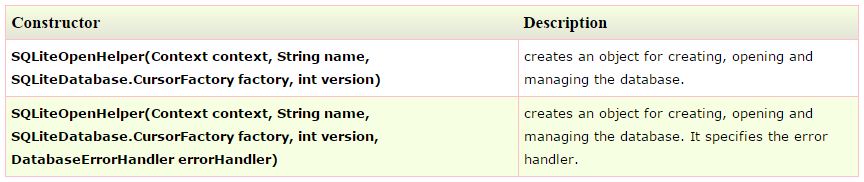
Methods of SQLiteOpenHelper class
There are many methods in SQLiteOpenHelper class. Some of them are as follows: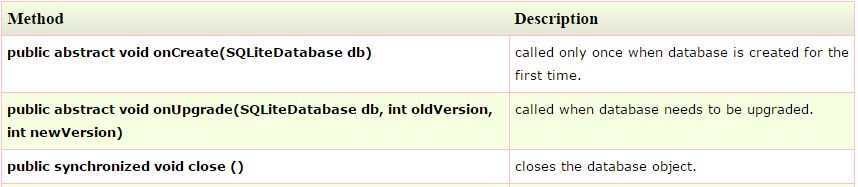
SQLiteDatabase class
It contains methods to be performed on sqlite database such as create, update, delete, select etc.Methods of SQLiteDatabase class
There are many methods in SQLiteDatabase class. Some of them are as follows: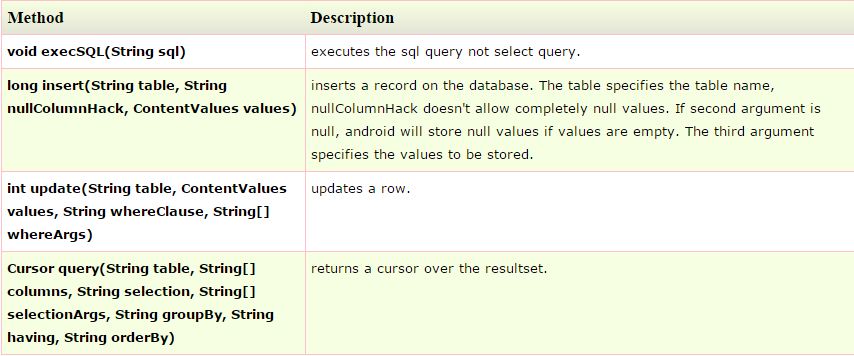
ContentValues : This class is used to store a set of values.
All CRUD Operations (Create, Read, Update and Delete)
In this tutorial we are taking an example of storing user contacts in SQLite database. I am using a table calledtb_employee to store employee details. This table contains three columns id (INTEGER), name (TEXT), age(INTEGER).Employee Table Structure
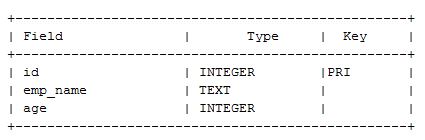
Step 1: Writing SQLite Database Handler Class
We need to write our own class to handle all database CRUD(Create, Read, Update and Delete) operations.1. Extend your class (DatabaseHandler.java) from SQLiteOpenHelper.
public class DatabaseHandler extends SQLiteOpenHelper {
2.After extending your class from SQLiteOpenHelper you need to override two methods onCreate() and onUpgrage()a. onCreate()These is where we need to write create table statements. This is called when database is created.
b. onUpgrade()This method is called when database is upgraded like modifying the table structure, adding constraints to database etc.,
package com.example.androidcollegeppt;

import java.util.ArrayList;
import java.util.HashMap;
import android.content.ContentValues;
import android.content.Context;
import android.database.Cursor;
import android.database.sqlite.SQLiteDatabase;
import android.database.sqlite.SQLiteOpenHelper;

public class DatabaseHandler extends SQLiteOpenHelper {

    public DatabaseHandler(Context context) {
        super(context, "Company.db", null, 1);
    }
	@Override
	public void onCreate(SQLiteDatabase db) {
		 db.execSQL("create table tb_employee(id INTEGER PRIMARY KEY AUTOINCREMENT,emp_name TEXT,age INTEGER);");
 		 db.execSQL("create table tb_reg(uname TEXT,pwd TEXT);");
	}
	@Override
	public void onUpgrade(SQLiteDatabase db, int oldVersion, int newVersion) {
		db.execSQL("DROP TABLE IF EXISTS tb_employee");
		 db.execSQL("DROP TABLE IF EXISTS tb_reg");
		onCreate(db);
	}
	 // Getting Add Emp Details
    public long addEmpDetails(String ename, int age) {
        SQLiteDatabase db = this.getWritableDatabase();

        ContentValues values = new ContentValues();
        values.put("emp_name", ename);
        values.put("age", age);

        // Inserting Row
        long a = db.insert("tb_employee", null, values);
        db.close(); // Closing database connection
        return a;
    }
 // Getting All Emp
    public ArrayList<HashMap<String,String>> getAllEmployee() {
    	ArrayList<HashMap<String,String>> alEmpList = new ArrayList<HashMap<String,String>>();
        // Select All Query
        String selectQuery = "SELECT  * FROM tb_employee;";

        SQLiteDatabase db = this.getWritableDatabase();
        Cursor cursor = db.rawQuery(selectQuery, null);
        HashMap<String,String> hm;
        // looping through all rows and adding to list
        if (cursor.moveToFirst()) {
            do {
            	hm=new HashMap<String,String>();
            	hm.put("id", ""+cursor.getInt(0));
            	hm.put("emp_name", ""+cursor.getString(1));
            	hm.put("age", ""+cursor.getInt(2));
                // Adding emp to list
            	alEmpList.add(hm);
            } while (cursor.moveToNext());
        }

        // return contact list
        return alEmpList;
    }
    public int updateEmployee(String name,int age) {
        SQLiteDatabase db = this.getWritableDatabase();

        ContentValues values = new ContentValues();
        values.put("emp_name", name);
        values.put("age", age);
        // updating row
        return db.update("tb_employee", values, " emp_name= ?",new String[] { name });
    }
 // Deleting single emp
    public int deleteEmp(String name) {
        SQLiteDatabase db = this.getWritableDatabase();
        int size=db.delete("tb_employee",  " emp_name= ?",
                new String[] { name });
        db.close();
        return size;
    }
}
4. Usage
package com.example.androidcollegeppt;

import java.util.ArrayList;
import java.util.HashMap;

import android.app.Activity;
import android.os.Bundle;
import android.view.View;
import android.view.View.OnClickListener;
import android.widget.Button;
import android.widget.EditText;
import android.widget.Toast;

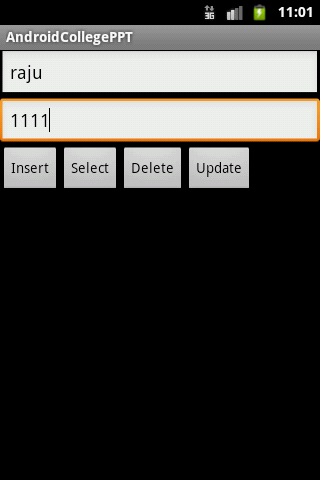
public class SQLiteDemo extends Activity{
	EditText et_name,et_age;
	Button btn_insert,btn_select,btn_delete,btn_update;
	DatabaseHandler db;
	@Override
	protected void onCreate(Bundle savedInstanceState) {
		// TODO Auto-generated method stub
		super.onCreate(savedInstanceState);
		setContentView(R.layout.a_sqlite_demo);
		db=new DatabaseHandler(this);
		et_name=(EditText)findViewById(R.id.et_name);
		et_age=(EditText)findViewById(R.id.et_age);
		btn_insert=(Button)findViewById(R.id.btn_insert);
		btn_select=(Button)findViewById(R.id.btn_select);
		btn_delete=(Button)findViewById(R.id.btn_delete);
		btn_update=(Button)findViewById(R.id.btn_update);
		btn_insert.setOnClickListener(new OnClickListener() {
			@Override
			public void onClick(View v) {
				int age=Integer.parseInt(et_age.getText().toString());
				long rec=db.addEmpDetails(et_name.getText().toString(), age);
				if(rec>0)
				{
					Toast.makeText(getApplicationContext(), "Records are inserted.", Toast.LENGTH_SHORT).show();
				}else{
					Toast.makeText(getApplicationContext(), "Records are not inserted.", Toast.LENGTH_SHORT).show();
				}
			}
		});
		btn_select.setOnClickListener(new OnClickListener() {
			@Override
			public void onClick(View v) {
				ArrayList<HashMap<String, String>>	alEmps=db.getAllEmployee();
				int size=alEmps.size();
				Toast.makeText(getApplicationContext(), "No.of Employee :"+size, Toast.LENGTH_SHORT).show();

			}
		});
		btn_update.setOnClickListener(new OnClickListener() {
			@Override
			public void onClick(View v) {
				String name=et_name.getText().toString();
				String age=et_age.getText().toString();
				int size=db.updateEmployee(name,Integer.parseInt(age));
				if(size>0)
				{
					Toast.makeText(getApplicationContext(), "Employee details updated."+size, Toast.LENGTH_SHORT).show();
				}else{
					Toast.makeText(getApplicationContext(), "Employee not details updated."+size, Toast.LENGTH_SHORT).show();
				}
			}
		});
		btn_delete.setOnClickListener(new OnClickListener() {
			@Override
			public void onClick(View v) {
				String name=et_name.getText().toString();
				int size=db.deleteEmp(name);
				if(size>0)
				{
					Toast.makeText(getApplicationContext(), "Employee details deleted."+size, Toast.LENGTH_SHORT).show();
				}else{
					Toast.makeText(getApplicationContext(), "Employee not details deleted."+size, Toast.LENGTH_SHORT).show();
				}
			}
		});

	}
}
<?xml version="1.0" encoding="utf-8"?>
<LinearLayout xmlns:android="http://schemas.android.com/apk/res/android"
    android:layout_width="match_parent"
    android:layout_height="match_parent"
    android:orientation="vertical" >

    <EditText
        android:id="@+id/et_name"
        android:layout_width="match_parent"
        android:layout_height="wrap_content"
        android:ems="10" >

        <requestFocus />
    </EditText>

    <EditText
        android:id="@+id/et_age"
        android:layout_width="match_parent"
        android:layout_height="wrap_content"
        android:ems="10" />

    <LinearLayout
        android:layout_width="match_parent"
        android:layout_height="wrap_content"
        android:orientation="horizontal" >

        <Button
            android:id="@+id/btn_insert"
            android:layout_width="wrap_content"
            android:layout_height="wrap_content"
            android:text="Insert" />

        <Button
            android:id="@+id/btn_select"
            android:layout_width="wrap_content"
            android:layout_height="wrap_content"
            android:text="Select" />
         <Button
            android:id="@+id/btn_delete"
            android:layout_width="wrap_content"
            android:layout_height="wrap_content"
            android:text="Delete" />
          <Button
            android:id="@+id/btn_update"
            android:layout_width="wrap_content"
            android:layout_height="wrap_content"
            android:text="Update" />
    </LinearLayout>

</LinearLayout>