Introduction
Android Componets
UserInterface
Advanced UI
Data Storage
Advanced Concepts
Others
New Studio
Download ICONS
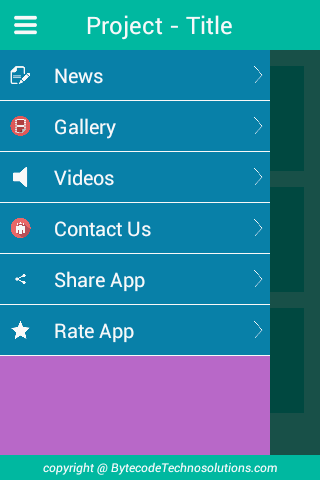
Example -1
File:layout/activity_sidemenu.xml
<?xml version="1.0" encoding="utf-8"?>
<RelativeLayout xmlns:android="http://schemas.android.com/apk/res/android"
    android:layout_width="match_parent"
    android:layout_height="match_parent"
    android:background="#43CDBE" >

    <RelativeLayout
        android:layout_width="match_parent"
        android:layout_height="50dp"
        android:background="#00BBA6">

        <ImageButton
            android:id="@+id/ibSideMenu"
            android:layout_width="45dp"
            android:layout_height="45dp"
            android:layout_margin="3dp"
            android:padding="3dp"
            android:background="@drawable/menu" />

        <TextView
            android:layout_width="wrap_content"
            android:layout_height="wrap_content"
            android:layout_below="@+id/imageView1"
            android:layout_centerHorizontal="true"
            android:layout_centerVertical="true"
            android:text="Project - Title"
            android:textColor="#FFF"
            android:textSize="24sp" />
    </RelativeLayout>

    <android.support.v4.widget.DrawerLayout
        android:id="@+id/side_menu_layout"
        android:layout_width="match_parent"
        android:layout_height="match_parent"
        android:layout_marginBottom="25dp"
        android:layout_marginTop="50dp" >

        <ScrollView
            android:layout_width="match_parent"
            android:layout_height="match_parent" >

            <LinearLayout
                android:layout_width="match_parent"
                android:layout_height="match_parent"
                android:orientation="vertical" >

                <LinearLayout
                    android:layout_width="match_parent"
                    android:layout_height="wrap_content"
                    android:orientation="horizontal" >

                    <RelativeLayout
                        android:layout_width="0dp"
                        android:layout_height="wrap_content"
                        android:layout_marginLeft="16dp"
                        android:layout_marginTop="16dp"
                        android:layout_weight="1"
                        android:background="#00BBA6" >

                        <ImageView
                            android:id="@+id/imageView1"
                            android:layout_width="75dp"
                            android:layout_height="75dp"
                            android:layout_centerHorizontal="true"
                            android:padding="8dp"
                            android:src="@drawable/ic1" />

                        <TextView
                            android:layout_width="wrap_content"
                            android:layout_height="wrap_content"
                            android:layout_below="@+id/imageView1"
                            android:layout_centerHorizontal="true"
                            android:paddingBottom="8dp"
                            android:text="Title1"
                            android:textColor="#FFF"
                            android:textSize="16sp" />
                    </RelativeLayout>

                    <RelativeLayout
                        android:layout_width="0dp"
                        android:layout_height="wrap_content"
                        android:layout_marginLeft="16dp"
                        android:layout_marginRight="16dp"
                        android:layout_marginTop="16dp"
                        android:layout_weight="1"
                        android:background="#00BBA6" >

                        <ImageView
                            android:id="@+id/imageView2"
                            android:layout_width="75dp"
                            android:layout_height="75dp"
                            android:layout_centerHorizontal="true"
                            android:padding="8dp"
                            android:src="@drawable/ic2" />

                        <TextView
                            android:layout_width="wrap_content"
                            android:layout_height="wrap_content"
                            android:layout_below="@+id/imageView2"
                            android:layout_centerHorizontal="true"
                            android:paddingBottom="8dp"
                            android:text="Title2"
                            android:textColor="#FFF"
                            android:textSize="16sp" />
                    </RelativeLayout>
                </LinearLayout>

                <LinearLayout
                    android:layout_width="match_parent"
                    android:layout_height="wrap_content"
                    android:orientation="horizontal" >

                    <RelativeLayout
                        android:layout_width="0dp"
                        android:layout_height="wrap_content"
                        android:layout_marginLeft="16dp"
                        android:layout_marginTop="16dp"
                        android:layout_weight="1"
                        android:background="#00BBA6" >

                        <ImageView
                            android:id="@+id/imageView3"
                            android:layout_width="75dp"
                            android:layout_height="75dp"
                            android:layout_centerHorizontal="true"
                            android:padding="8dp"
                            android:src="@drawable/ic3" />

                        <TextView
                            android:layout_width="wrap_content"
                            android:layout_height="wrap_content"
                            android:layout_below="@+id/imageView3"
                            android:layout_centerHorizontal="true"
                            android:paddingBottom="8dp"
                            android:text="Title3"
                            android:textColor="#FFF"
                            android:textSize="16sp" />
                    </RelativeLayout>

                    <RelativeLayout
                        android:layout_width="0dp"
                        android:layout_height="wrap_content"
                        android:layout_marginLeft="16dp"
                        android:layout_marginRight="16dp"
                        android:layout_marginTop="16dp"
                        android:layout_weight="1"
                        android:background="#00BBA6" >

                        <ImageView
                            android:id="@+id/imageView4"
                            android:layout_width="75dp"
                            android:layout_height="75dp"
                            android:layout_centerHorizontal="true"
                            android:padding="8dp"
                            android:src="@drawable/ic4" />

                        <TextView
                            android:layout_width="wrap_content"
                            android:layout_height="wrap_content"
                            android:layout_below="@+id/imageView4"
                            android:layout_centerHorizontal="true"
                            android:paddingBottom="8dp"
                            android:text="Title4"
                            android:textColor="#FFF"
                            android:textSize="16sp" />
                    </RelativeLayout>
                </LinearLayout>

                <LinearLayout
                    android:layout_width="match_parent"
                    android:layout_height="wrap_content"
                    android:orientation="horizontal" >

                    <RelativeLayout
                        android:layout_width="0dp"
                        android:layout_height="wrap_content"
                        android:layout_marginLeft="16dp"
                        android:layout_marginTop="16dp"
                        android:layout_weight="1"
                        android:background="#00BBA6" >

                        <ImageView
                            android:id="@+id/imageView5"
                            android:layout_width="75dp"
                            android:layout_height="75dp"
                            android:layout_centerHorizontal="true"
                            android:padding="8dp"
                            android:src="@drawable/i5" />

                        <TextView
                            android:layout_width="wrap_content"
                            android:layout_height="wrap_content"
                            android:layout_below="@+id/imageView5"
                            android:layout_centerHorizontal="true"
                            android:paddingBottom="8dp"
                            android:text="Title5"
                            android:textColor="#FFF"
                            android:textSize="16sp" />
                    </RelativeLayout>

                    <RelativeLayout
                        android:layout_width="0dp"
                        android:layout_height="wrap_content"
                        android:layout_marginLeft="16dp"
                        android:layout_marginRight="16dp"
                        android:layout_marginTop="16dp"
                        android:layout_weight="1"
                        android:background="#00BBA6" >

                        <ImageView
                            android:id="@+id/imageView6"
                            android:layout_width="75dp"
                            android:layout_height="75dp"
                            android:layout_centerHorizontal="true"
                            android:padding="8dp"
                            android:src="@drawable/ic6" />

                        <TextView
                            android:layout_width="wrap_content"
                            android:layout_height="wrap_content"
                            android:layout_below="@+id/imageView6"
                            android:layout_centerHorizontal="true"
                            android:paddingBottom="8dp"
                            android:text="Title6"
                            android:textColor="#FFF"
                            android:textSize="16sp" />
                    </RelativeLayout>
                </LinearLayout>
            </LinearLayout>
        </ScrollView>

        <ListView
            android:id="@+id/listview_side_menu"
            android:layout_width="270dp"
            android:layout_height="match_parent"
            android:layout_gravity="start"
            android:background="#BA68C8"
            android:choiceMode="singleChoice"
            android:divider="@android:color/white"
            android:dividerHeight="1dp"
            android:fadingEdge="none"
            android:scrollbarSize="10dp" />
    </android.support.v4.widget.DrawerLayout>

    <RelativeLayout
        android:layout_width="match_parent"
        android:layout_height="25dp"
        android:layout_alignParentBottom="true"
        android:background="#00BBA6" >

        <TextView
            android:layout_width="wrap_content"
            android:layout_height="wrap_content"
            android:layout_below="@+id/imageView1"
            android:layout_centerHorizontal="true"
            android:layout_centerVertical="true"
            android:text="copyright @ BytecodeTechnosolutions.com"
            android:textColor="#FFF"
            android:textSize="12sp"
            android:textStyle="italic" />
    </RelativeLayout>

</RelativeLayout>
File: res/layout/row_side_menu.xml
<?xml version="1.0" encoding="utf-8"?>
<RelativeLayout xmlns:android="http://schemas.android.com/apk/res/android"
    android:layout_width="match_parent"
    android:layout_height="match_parent"
    android:padding="3dp"
    android:background="#0C81AD" >

    <ImageView
        android:id="@+id/ivIcon"
        android:layout_width="25dp"
        android:layout_height="20dp"
        android:layout_centerVertical="true"
        android:layout_margin="5dp"
        android:src="@drawable/ic_sound" />

    <TextView
        android:id="@+id/tvTitle"
        android:layout_width="match_parent"
        android:layout_height="wrap_content"
        android:layout_centerVertical="true"
        android:layout_marginLeft="8dp"
        android:layout_toLeftOf="@+id/ivArrow"
        android:layout_toRightOf="@+id/ivIcon"
        android:padding="8dp"
        android:text="Title"
        android:textColor="#FFF"
        android:textSize="20sp" />

    <ImageView
        android:id="@+id/ivArrow"
        android:layout_width="17dp"
        android:layout_height="17dp"
        android:layout_alignParentRight="true"
        android:layout_centerVertical="true"
        android:src="@drawable/arrow" />

</RelativeLayout>
Create a folder called anim in res folder.
File: res/anim/menu_rotate.xml
<?xml version="1.0" encoding="utf-8"?>
<set xmlns:android="http://schemas.android.com/apk/res/android" >

    <rotate
        android:duration="300"
        android:fromDegrees="0"
        android:pivotX="50%"
        android:pivotY="50%"
        android:toDegrees="-180" >
    </rotate>
</set>
File: SideMenuActivity.java
import android.app.Activity;
import android.content.Context;
import android.os.Bundle;
import android.support.v4.widget.DrawerLayout;
import android.view.LayoutInflater;
import android.view.MotionEvent;
import android.view.View;
import android.view.View.OnClickListener;
import android.view.View.OnTouchListener;
import android.view.ViewGroup;
import android.view.animation.Animation;
import android.view.animation.AnimationUtils;
import android.widget.AdapterView;
import android.widget.AdapterView.OnItemClickListener;
import android.widget.BaseAdapter;
import android.widget.ImageButton;
import android.widget.ImageView;
import android.widget.ListView;
import android.widget.TextView;
import android.widget.Toast;

public class SideMenuActivity extends Activity{

	private ImageButton ibSideMenu;
	private ListView listview_side_menu;

	@Override
	protected void onCreate(Bundle savedInstanceState) {
		super.onCreate(savedInstanceState);
		setContentView(R.layout.activity_sidemenu);
		ibSideMenu=(ImageButton)findViewById(R.id.ibSideMenu);
		listview_side_menu=(ListView)findViewById(R.id.listview_side_menu);
		sideDrawerLayout();
	}

	Animation animationR;
	String[] menu;
	int icons[];
	DrawerLayout side_menu_layout;
	private void sideDrawerLayout(){
		animationR = AnimationUtils.loadAnimation(this, R.anim.menu_rotate);
		menu = new String[]{"News","Gallery","Videos","Contact Us","Share App","Rate App"};
		icons=new int[]{R.drawable.article,R.drawable.ic_gallery,R.drawable.ic_sound,R.drawable.ic_about,R.drawable.ic_share,R.drawable.rate_app};
		side_menu_layout = (DrawerLayout) findViewById(R.id.side_menu_layout);
		side_menu_layout.setOnTouchListener(new OnTouchListener() {
			@Override
			public boolean onTouch(View v, MotionEvent event) {
				ibSideMenu.startAnimation(animationR);
				return false;
			}
		});
		listview_side_menu = (ListView) findViewById(R.id.listview_side_menu);
		SideMenuLayout();

		listview_side_menu.setOnItemClickListener(new OnItemClickListener(){
			@Override
			public void onItemClick(AdapterView<?> arg0, View v, int position, long id) {
				side_menu_layout.closeDrawers();
				selectActivity(position);
			}
		});

		ibSideMenu=(ImageButton)findViewById(R.id.ibSideMenu);
		ibSideMenu.setOnClickListener(new OnClickListener(){
			@Override
			public void onClick(View arg0) {
				ibSideMenu.startAnimation(animationR);
				if(side_menu_layout.isDrawerOpen(listview_side_menu)){
					side_menu_layout.closeDrawers();
				}else{
					side_menu_layout.openDrawer(listview_side_menu);
				}
			}
		});
	}
	private void SideMenuLayout(){
		adpter=new SideMenuAdapter(getApplicationContext(),menu);
		listview_side_menu.setAdapter(adpter);
	}

	SideMenuAdapter adpter;
	public class SideMenuAdapter extends BaseAdapter
	{
		private Context context;
		String titles[];
		public SideMenuAdapter(Context c,String[] str)
		{
			// TODO Auto-generated method stub
			context = c;
			titles = str;
		}

		public int getCount() {
			// TODO Auto-generated method stub
			return titles.length;
		}

		public Object getItem(int position) {
			// TODO Auto-generated method stub
			return position;
		}

		public long getItemId(int position) {
			// TODO Auto-generated method stub
			return position;
		}

		@Override
		public View getView(int position, View convertView, ViewGroup parent) {
			View row = convertView;
			ViewHolder holder = null;
			if(row == null){
				LayoutInflater inflater = (LayoutInflater) context.getSystemService(Context.LAYOUT_INFLATER_SERVICE);
				row = inflater.inflate(R.layout.row_side_menu, null);
				holder = new ViewHolder();
				holder.imageView = (ImageView) row.findViewById(R.id.ivIcon);
				holder.tvTile=(TextView)row.findViewById(R.id.tvTitle);
				row.setTag(holder);
			}else{
				holder = (ViewHolder)row.getTag();
			}

			holder.tvTile.setText(titles[position]);
			holder.imageView.setImageResource(icons[position]);
			return row;
		}
		class ViewHolder{
			TextView tvTile;
			ImageView imageView;
		}
	}
	private void selectActivity(int pos){
		switch (pos) {
		case 0:
			Toast.makeText(getApplicationContext(), "News selected.", Toast.LENGTH_SHORT).show();
			break;
		case 1:
			Toast.makeText(getApplicationContext(), "Gallery selected.", Toast.LENGTH_SHORT).show();
			break;
		case 2:
			Toast.makeText(getApplicationContext(), "Videos selected.", Toast.LENGTH_SHORT).show();
			break;
		case 3:
			Toast.makeText(getApplicationContext(), "Contact Us selected", Toast.LENGTH_SHORT).show();
			break;
		case 4:
			Toast.makeText(getApplicationContext(), "Share App selected", Toast.LENGTH_SHORT).show();
			break;
		case 5:
			Toast.makeText(getApplicationContext(), "Rate App selected", Toast.LENGTH_SHORT).show();
			break;
		default:
			break;
		}
	}
}
Get APIKey Here
Download youtube player
Download youtube player
Example -1
File:a_youtube_player.xml
<RelativeLayout xmlns:android="http://schemas.android.com/apk/res/android"
    xmlns:tools="http://schemas.android.com/tools"
    android:layout_width="match_parent"
    android:layout_height="match_parent" >

    <com.google.android.youtube.player.YouTubePlayerView
        android:id="@+id/youtube_view"
        android:layout_width="match_parent"
        android:layout_height="match_parent" />

</RelativeLayout>
File: A_YoutubePlayer.java
import android.content.Intent;
import android.os.Bundle;
import android.view.Window;
import android.view.WindowManager;
import android.widget.Toast;

import com.google.android.youtube.player.YouTubeBaseActivity;
import com.google.android.youtube.player.YouTubeInitializationResult;
import com.google.android.youtube.player.YouTubePlayer;
import com.google.android.youtube.player.YouTubePlayer.PlayerStyle;
import com.google.android.youtube.player.YouTubePlayerView;
//public static final String VIDEO_ID = "EH5ocxcEiiY";
//

public class A_YoutubePlayer extends YouTubeBaseActivity implements
        YouTubePlayer.OnInitializedListener {

    private static final int RECOVERY_DIALOG_REQUEST = 1;

    // YouTube player view
    private YouTubePlayerView youTubeView;
    private String video_id="";
    @Override
    protected void onCreate(Bundle savedInstanceState) {
        super.onCreate(savedInstanceState);
        requestWindowFeature(Window.FEATURE_NO_TITLE);
        getWindow().setFlags(WindowManager.LayoutParams.FLAG_FULLSCREEN, WindowManager.LayoutParams.FLAG_FULLSCREEN);
        setContentView(R.layout.a_youtube_player);
        video_id=getIntent().getExtras().getString("video_id");
        //video_id="cRp5EkGVHew";
        youTubeView = (YouTubePlayerView) findViewById(R.id.youtube_view);
        youTubeView.initialize("AIzaSyD06EC2RvW5FdXTNyhzpXjpmTr9mRzuJZg", this);
    }

    @Override
    public void onInitializationFailure(YouTubePlayer.Provider provider, YouTubeInitializationResult errorReason) {
        if (errorReason.isUserRecoverableError()) {
            errorReason.getErrorDialog(this, RECOVERY_DIALOG_REQUEST).show();
        } else {

            Toast.makeText(this, "Error", Toast.LENGTH_LONG).show();
        }
    }

    @Override
    public void onInitializationSuccess(YouTubePlayer.Provider provider, YouTubePlayer player, boolean wasRestored) {
        if (!wasRestored) {

            // loadVideo() will auto play video
            // Use cueVideo() method, if you don't want to play it automatically
            player.loadVideo(video_id);
            // Hiding player controls
            player.setPlayerStyle(PlayerStyle.DEFAULT);
        }
    }

    @Override
    protected void onActivityResult(int requestCode, int resultCode, Intent data) {
        if (requestCode == RECOVERY_DIALOG_REQUEST) {
            // Retry initialization if user performed a recovery action
            getYouTubePlayerProvider().initialize("AIzaSyD06EC2RvW5FdXTNyhzpXjpmTr9mRzuJZg", this);
        }
    }

    private YouTubePlayer.Provider getYouTubePlayerProvider() {
        return (YouTubePlayerView) findViewById(R.id.youtube_view);
    }

}
Example -1
File:activity_main.xml
<?xml version="1.0" encoding="utf-8"?>
<RelativeLayout xmlns:android="http://schemas.android.com/apk/res/android"
    xmlns:ads="http://schemas.android.com/apk/res-auto"
    android:layout_width="match_parent"
    android:layout_height="match_parent"
    android:background="#eaeaea" >

    <RelativeLayout
        android:id="@+id/rlTop"
        android:layout_width="match_parent"
        android:layout_height="50dp"
        android:background="#01B9FF" >

        <TextView
            android:layout_width="wrap_content"
            android:layout_height="wrap_content"
            android:layout_centerInParent="true"
            android:layout_marginLeft="30dp"
            android:text="Project - Title"
            android:textColor="#FFF"
            android:textSize="24sp"
            android:textStyle="bold" />

        <ImageButton
            android:id="@+id/ibBack"
            android:layout_width="45dp"
            android:layout_height="45dp"
            android:layout_centerVertical="true"
            android:layout_margin="3dp"
            android:background="@drawable/back" />
    </RelativeLayout>

    <GridView
        android:id="@+id/gvGallery"
        android:layout_width="match_parent"
        android:layout_height="match_parent"
        android:layout_centerHorizontal="true"
        android:layout_marginBottom="25dp"
        android:layout_marginTop="50dp"
        android:cacheColorHint="@android:color/transparent"
        android:columnWidth="150dp"
        android:gravity="center"
        android:horizontalSpacing="5dip"
        android:numColumns="auto_fit"
        android:stretchMode="columnWidth"
        android:verticalSpacing="5dip" >
    </GridView>

    <RelativeLayout
        android:id="@+id/rlBottom"
        android:layout_width="match_parent"
        android:layout_height="25dp"
        android:layout_alignParentBottom="true"
        android:background="#01B9FF" >

        <TextView
            android:layout_width="wrap_content"
            android:layout_height="wrap_content"
            android:layout_centerInParent="true"
            android:text="copyright @ 2015 Bytecode"
            android:textColor="#FFF"
            android:textSize="16sp"
            android:textStyle="bold" />
    </RelativeLayout>

</RelativeLayout>
File: row_gridview.xml
<?xml version="1.0" encoding="utf-8"?>
<RelativeLayout xmlns:android="http://schemas.android.com/apk/res/android"
    android:layout_width="wrap_content"
    android:layout_height="wrap_content" >

    <ImageView
        android:id="@+id/ivImage"
        android:layout_width="150dp"
        android:layout_height="150dp"
        android:padding="3dp"
        android:scaleType="fitXY" />

    <TextView
        android:id="@+id/tvTitle"
        android:layout_width="150dp"
        android:layout_height="wrap_content"
        android:layout_alignParentBottom="true"
        android:layout_margin="3dp"
        android:background="#99000000"
        android:padding="3dp"
        android:gravity="center"
        android:textColor="#FFF" />

</RelativeLayout>
File: GridActivity.java
import java.util.ArrayList;
import java.util.HashMap;

import org.json.JSONArray;
import org.json.JSONException;
import org.json.JSONObject;

import android.app.Activity;
import android.app.ProgressDialog;
import android.content.Context;
import android.os.Bundle;
import android.util.Log;
import android.view.LayoutInflater;
import android.view.View;
import android.view.View.OnClickListener;
import android.view.ViewGroup;
import android.widget.BaseAdapter;
import android.widget.GridView;
import android.widget.ImageView;
import android.widget.TextView;
import android.widget.Toast;

import com.android.volley.RequestQueue;
import com.android.volley.Response;
import com.android.volley.VolleyError;
import com.android.volley.toolbox.StringRequest;
import com.android.volley.toolbox.Volley;
import com.squareup.picasso.Picasso;

public class GalleryActivity extends Activity{
	GridView gvGallery;
	@Override
	protected void onCreate(Bundle savedInstanceState) {
		super.onCreate(savedInstanceState);
		setContentView(R.layout.activity_gallery);
		gvGallery=(GridView)findViewById(R.id.gvGallery);
		MakeStringValleyServerRequest("http://bytecodetechnosolutions.com/BCSubPlan/APIs/v1/getPhotos.php");
	}

	ProgressDialog pd;
	RequestQueue queue;
	ArrayList<HashMap<String, String>> al;
	private void MakeStringValleyServerRequest(String url){
		pd=new ProgressDialog(GalleryActivity.this);
		pd.setTitle("Please wait,data is being processed...");
		pd.show();
		queue = Volley.newRequestQueue(getApplicationContext());

		StringRequest galleryReq = new StringRequest(url,new Response.Listener<String>() {
			@Override
			public void onResponse(String response) {
				parseData(response);
				pd.hide();
			}
		}, new Response.ErrorListener() {
			@Override
			public void onErrorResponse(VolleyError error) {
				pd.hide();
			}
		});

		queue.add(galleryReq);

	}
	ArrayList<HashMap<String, String>> alData;
	HashMap<String, String> hm;
	private void parseData(String data){

		alData=new ArrayList<HashMap<String, String>>();
		alData.clear();
		try {
			JSONObject json=new JSONObject(data);
			JSONArray jArray=json.getJSONArray("items");
			JSONObject jObj;
			for(int i=0;i<jArray.length();i++){
				jObj = jArray.getJSONObject(i);
				hm=new HashMap<String, String>();
				hm.put("title", jObj.getString("title"));
				hm.put("image_url", jObj.getString("image_url"));
				alData.add(hm);
			}
			gvGallery.setAdapter(new CustomAdapter(this, alData));
		} catch (JSONException e) {
			// TODO Auto-generated catch block
			e.printStackTrace();
		}
	}
	private static LayoutInflater inflater=null;
	public class CustomAdapter extends BaseAdapter{

		Context context;
		ArrayList<HashMap<String, String>> alData1;
		public CustomAdapter(Context mainActivity, ArrayList<HashMap<String, String>> al) {
			alData1=al;
			context=mainActivity;
			inflater = ( LayoutInflater )context. getSystemService(Context.LAYOUT_INFLATER_SERVICE);
		}
		@Override
		public int getCount() {
			return alData1.size();
		}

		@Override
		public Object getItem(int position) {
			return position;
		}

		@Override
		public long getItemId(int position) {
			return position;
		}


		@Override
		public View getView(final int position, View convertView, ViewGroup parent) {
			if(convertView==null){
				convertView = inflater.inflate(R.layout.row_gallery, null);
			}
			HashMap<String, String> hm=alData1.get(position);
			TextView tvTitle=(TextView) convertView.findViewById(R.id.tvTitle);
			ImageView img=(ImageView) convertView.findViewById(R.id.ivImage);
			Log.d("image_url",hm.get("image_url"));
			Picasso.with(context).load(hm.get("image_url")).into(img);
			tvTitle.setText(hm.get("title"));
			convertView.setOnClickListener(new OnClickListener() {
				@Override
				public void onClick(View v) {
					Toast.makeText(context, "You Clicked ", Toast.LENGTH_LONG).show();
				}
			});
			return convertView;
		}
	}
}
JSON Array POST
<?php
if( isset($_POST["json"]) ) {
     $data = json_decode($_POST["json"],true);
$hostname = "localhost";
            $dbname = "teluguce_googlemaps";
            $username = "teluguce_hari";
            $password = "hari1039$";
            $usertable = "tb_test_json";
            $con=mysql_connect($hostname, $username, $password) OR DIE ("Unable to connect to database! Please try again later.");
            mysql_select_db($dbname);
$sql = "INSERT INTO tb_test_json (employee_id, question_id, answer, comment) values ";
$valuesArr = array();
foreach($data as $row) {
$employee_id = (int) $row['employee_id'];
        $question_id = mysql_real_escape_string( $row['question_id'] );
        $answer = mysql_real_escape_string( $row['answer'] );
        $comment = mysql_real_escape_string( $row['question_id'] );

        $valuesArr[] = "('$employee_id', '$question_id', '$answer','$comment')";
}
$sql .= implode(',', $valuesArr);
//echo $sql;
mysql_query($sql) or exit(mysql_error());
}else{
echo 'Failed.';
}
?>
package com.example.androidcollegeppt;

import java.util.HashMap;
import java.util.Map;

import org.json.JSONArray;
import org.json.JSONObject;

import android.app.Activity;
import android.app.ProgressDialog;
import android.os.Bundle;

import com.android.volley.Request;
import com.android.volley.Response;
import com.android.volley.VolleyError;
import com.android.volley.toolbox.StringRequest;
import com.android.volley.toolbox.Volley;

public class SubmitJSONArray extends Activity{
	ProgressDialog pd1;
	String post_data;
	@Override
	protected void onCreate(Bundle savedInstanceState) {
		super.onCreate(savedInstanceState);
		setContentView(R.layout.a_json_submitdata);
		JSONArray jData = new JSONArray();
		try{
			for (int i = 0; i < 5; i++) {
				JSONObject jObj = new JSONObject();
				jObj.put("employee_id", "989898"+i);
				jObj.put("question_id", "question-"+i);
				jObj.put("answer", "answer-"+i);
				jData.put(jObj);
			}
		}catch(Exception e){}
		post_data=jData.toString();
		pd1 = new ProgressDialog(SubmitJSONArray.this);
		pd1.setMessage("Please wait, Data is being Loaded.");
		pd1.show();
		// Request a string response
		StringRequest stringRequest = new StringRequest(Request.Method.POST, "http://telugucenimaentertainment.com/GoogleMaps/testJson.php", new Response.Listener<String>() {
			@Override
			public void onResponse(String response) {
				pd1.hide();
				pd1.cancel();
			}
		}, new Response.ErrorListener() {
			@Override
			public void onErrorResponse(VolleyError error) {
				pd1.hide();
				pd1.cancel();
			}
		}){
			@Override
			protected Map<String, String> getParams() {
				Map<String, String> params = new HashMap<String, String>();
				params.put("json",post_data);
				return params;
			}
		};

		Volley.newRequestQueue(this).add(stringRequest);

	}

}
Example -1
File:activity_main.xml
<?xml version="1.0" encoding="utf-8"?>
<RelativeLayout xmlns:android="http://schemas.android.com/apk/res/android"
    android:layout_width="match_parent"
    android:layout_height="match_parent"
    android:background="#43CDBE" >

    <RelativeLayout
        android:layout_width="match_parent"
        android:layout_height="50dp"
        android:background="#00BBA6" >

        <ImageView
            android:id="@+id/icMenu"
            android:layout_width="45dp"
            android:layout_height="45dp"
            android:layout_margin="3dp"
            android:padding="3dp"
            android:src="@drawable/menu" />

        <TextView
            android:layout_width="wrap_content"
            android:layout_height="wrap_content"
            android:layout_below="@+id/imageView1"
            android:layout_centerHorizontal="true"
            android:layout_centerVertical="true"
            android:text="Project - Title"
            android:textColor="#FFF"
            android:textSize="24sp" />
    </RelativeLayout>

    <ScrollView
        android:layout_width="match_parent"
        android:layout_height="match_parent"
        android:layout_marginBottom="25dp"
        android:layout_marginTop="55dp" >

        <LinearLayout
            android:layout_width="match_parent"
            android:layout_height="match_parent"
            android:orientation="vertical" >

            <LinearLayout
                android:layout_width="match_parent"
                android:layout_height="wrap_content"
                android:orientation="horizontal" >

                <RelativeLayout
                    android:layout_width="0dp"
                    android:layout_height="wrap_content"
                    android:layout_marginLeft="16dp"
                    android:layout_marginTop="16dp"
                    android:layout_weight="1"
                    android:background="#00BBA6" >

                    <ImageView
                        android:id="@+id/imageView1"
                        android:layout_width="75dp"
                        android:layout_height="75dp"
                        android:layout_centerHorizontal="true"
                        android:padding="8dp"
                        android:src="@drawable/ic1" />

                    <TextView
                        android:layout_width="wrap_content"
                        android:layout_height="wrap_content"
                        android:layout_below="@+id/imageView1"
                        android:layout_centerHorizontal="true"
                        android:paddingBottom="8dp"
                        android:text="Title1"
                        android:textColor="#FFF"
                        android:textSize="16sp" />
                </RelativeLayout>

                <RelativeLayout
                    android:layout_width="0dp"
                    android:layout_height="wrap_content"
                    android:layout_marginLeft="16dp"
                    android:layout_marginRight="16dp"
                    android:layout_marginTop="16dp"
                    android:layout_weight="1"
                    android:background="#00BBA6" >

                    <ImageView
                        android:id="@+id/imageView2"
                        android:layout_width="75dp"
                        android:layout_height="75dp"
                        android:layout_centerHorizontal="true"
                        android:padding="8dp"
                        android:src="@drawable/ic2" />

                    <TextView
                        android:layout_width="wrap_content"
                        android:layout_height="wrap_content"
                        android:layout_below="@+id/imageView2"
                        android:layout_centerHorizontal="true"
                        android:paddingBottom="8dp"
                        android:text="Title2"
                        android:textColor="#FFF"
                        android:textSize="16sp" />
                </RelativeLayout>
            </LinearLayout>

            <LinearLayout
                android:layout_width="match_parent"
                android:layout_height="wrap_content"
                android:orientation="horizontal" >

                <RelativeLayout
                    android:layout_width="0dp"
                    android:layout_height="wrap_content"
                    android:layout_marginLeft="16dp"
                    android:layout_marginTop="16dp"
                    android:layout_weight="1"
                    android:background="#00BBA6" >

                    <ImageView
                        android:id="@+id/imageView3"
                        android:layout_width="75dp"
                        android:layout_height="75dp"
                        android:layout_centerHorizontal="true"
                        android:padding="8dp"
                        android:src="@drawable/ic3" />

                    <TextView
                        android:layout_width="wrap_content"
                        android:layout_height="wrap_content"
                        android:layout_below="@+id/imageView3"
                        android:layout_centerHorizontal="true"
                        android:paddingBottom="8dp"
                        android:text="Title3"
                        android:textColor="#FFF"
                        android:textSize="16sp" />
                </RelativeLayout>

                <RelativeLayout
                    android:layout_width="0dp"
                    android:layout_height="wrap_content"
                    android:layout_marginLeft="16dp"
                    android:layout_marginRight="16dp"
                    android:layout_marginTop="16dp"
                    android:layout_weight="1"
                    android:background="#00BBA6" >

                    <ImageView
                        android:id="@+id/imageView4"
                        android:layout_width="75dp"
                        android:layout_height="75dp"
                        android:layout_centerHorizontal="true"
                        android:padding="8dp"
                        android:src="@drawable/ic4" />

                    <TextView
                        android:layout_width="wrap_content"
                        android:layout_height="wrap_content"
                        android:layout_below="@+id/imageView4"
                        android:layout_centerHorizontal="true"
                        android:paddingBottom="8dp"
                        android:text="Title4"
                        android:textColor="#FFF"
                        android:textSize="16sp" />
                </RelativeLayout>
            </LinearLayout>

            <LinearLayout
                android:layout_width="match_parent"
                android:layout_height="wrap_content"
                android:orientation="horizontal" >

                <RelativeLayout
                    android:layout_width="0dp"
                    android:layout_height="wrap_content"
                    android:layout_marginLeft="16dp"
                    android:layout_marginTop="16dp"
                    android:layout_weight="1"
                    android:background="#00BBA6" >

                    <ImageView
                        android:id="@+id/imageView5"
                        android:layout_width="75dp"
                        android:layout_height="75dp"
                        android:layout_centerHorizontal="true"
                        android:padding="8dp"
                        android:src="@drawable/i5" />

                    <TextView
                        android:layout_width="wrap_content"
                        android:layout_height="wrap_content"
                        android:layout_below="@+id/imageView5"
                        android:layout_centerHorizontal="true"
                        android:paddingBottom="8dp"
                        android:text="Title5"
                        android:textColor="#FFF"
                        android:textSize="16sp" />
                </RelativeLayout>

                <RelativeLayout
                    android:layout_width="0dp"
                    android:layout_height="wrap_content"
                    android:layout_marginLeft="16dp"
                    android:layout_marginRight="16dp"
                    android:layout_marginTop="16dp"
                    android:layout_weight="1"
                    android:background="#00BBA6" >

                    <ImageView
                        android:id="@+id/imageView6"
                        android:layout_width="75dp"
                        android:layout_height="75dp"
                        android:layout_centerHorizontal="true"
                        android:padding="8dp"
                        android:src="@drawable/ic6" />

                    <TextView
                        android:layout_width="wrap_content"
                        android:layout_height="wrap_content"
                        android:layout_below="@+id/imageView6"
                        android:layout_centerHorizontal="true"
                        android:paddingBottom="8dp"
                        android:text="Title6"
                        android:textColor="#FFF"
                        android:textSize="16sp" />
                </RelativeLayout>
            </LinearLayout>
        </LinearLayout>
    </ScrollView>

    <RelativeLayout
        android:layout_width="match_parent"
        android:layout_height="25dp"
        android:layout_alignParentBottom="true"
        android:background="#00BBA6" >

        <TextView
            android:layout_width="wrap_content"
            android:layout_height="wrap_content"
            android:layout_below="@+id/imageView1"
            android:layout_centerHorizontal="true"
            android:layout_centerVertical="true"
            android:text="copyright @ BytecodeTechnosolutions.com"
            android:textColor="#FFF"
            android:textSize="12sp"
            android:textStyle="italic" />
    </RelativeLayout>

</RelativeLayout>
Download IconsFile:
RESULT :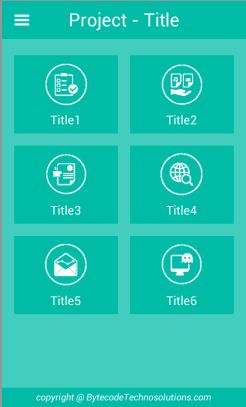
Steps : 1
File:ActivityManifeast.xml
<?xml version="1.0" encoding="utf-8"?>
<manifest xmlns:android="http://schemas.android.com/apk/res/android"
    package="com.example.helloworldapp"
    android:versionCode="1"
    android:versionName="1.0" >

    <uses-permission android:name="android.permission.WRITE_EXTERNAL_STORAGE" />
    <uses-permission android:name="android.permission.ACCESS_NETWORK_STATE" />
    <uses-permission android:name="android.permission.INTERNET" />
    <uses-permission android:name="android.permission.ACCESS_WIFI_STATE" />

    <uses-sdk
        android:minSdkVersion="8"
        android:targetSdkVersion="14" />

    <application
        android:allowBackup="true"
        android:icon="@drawable/ic_launcher"
        android:label="@string/app_name"
        android:theme="@style/AppTheme" >
        <activity
            android:name=".RegisterActivity"
            android:label="@string/app_name" >
            <intent-filter>
                <action android:name="android.intent.action.MAIN" />

                <category android:name="android.intent.category.LAUNCHER" />
            </intent-filter>
        </activity>
    </application>

</manifest>
Steps : 2
File:activity_register.xml
<LinearLayout xmlns:android="http://schemas.android.com/apk/res/android"
    xmlns:tools="http://schemas.android.com/tools"
    android:layout_width="match_parent"
    android:layout_height="match_parent"
    android:orientation="vertical" >

    <EditText
        android:id="@+id/etName"
        android:layout_width="match_parent"
        android:layout_height="wrap_content"
        android:ems="10" >

        <requestFocus />
    </EditText>

    <EditText
        android:id="@+id/etPhone"
        android:layout_width="match_parent"
        android:layout_height="wrap_content"
        android:layout_marginTop="25dp"
        android:ems="10" >
    </EditText>

    <Button
        android:id="@+id/btnSubmit"
        android:layout_width="wrap_content"
        android:layout_height="wrap_content"
        android:padding="8dp"
        android:text="Submit" />

</LinearLayout>
Steps : 3
File:RegisterActivity.java
package com.example.helloworldapp;


import java.util.HashMap;
import java.util.Map;
import android.app.Activity;
import android.app.ProgressDialog;
import android.os.Bundle;
import android.view.View;
import android.view.View.OnClickListener;
import android.widget.Button;
import android.widget.EditText;
import android.widget.Toast;
import com.android.volley.Request;
import com.android.volley.RequestQueue;
import com.android.volley.Response;
import com.android.volley.VolleyError;
import com.android.volley.toolbox.StringRequest;
import com.android.volley.toolbox.Volley;

public class RegisterActivity extends Activity {
	EditText etName,etPhone;
	Button btnSubmit;
	RequestQueue queue;
	Button btnClear;
	String DETAIL_URL = "http://eduautomations.com/FoodOn/v1/testing.php";
	@Override
	protected void onCreate(Bundle savedInstanceState) {
		super.onCreate(savedInstanceState);
		setContentView(R.layout.activity_register);
		etName=(EditText)findViewById(R.id.etName);
		etPhone=(EditText)findViewById(R.id.etPhone);
		btnSubmit=(Button)findViewById(R.id.btnSubmit);
		btnSubmit.setOnClickListener(new OnClickListener() {
			@Override
			public void onClick(View view) {
				MakeStringValleyServerRequest(DETAIL_URL,etName.getText().toString(),etPhone.getText().toString());
			}
		});

	}
	ProgressDialog pd;
	private void MakeStringValleyServerRequest(String url,final String name,final String phono){

		pd=new ProgressDialog(RegisterActivity.this);
		pd.setTitle("Please wait,data is being processed...");
		pd.show();

		queue = Volley.newRequestQueue(getApplicationContext());

		StringRequest jsObjRequest=new StringRequest(Request.Method.POST, url, new Response.Listener<String>(){
			@Override
			public void onResponse(String response) {
				pd.hide();
				Toast.makeText(getApplicationContext(), ""+response, Toast.LENGTH_SHORT).show();
			}},new Response.ErrorListener() {
				@Override
				public void onErrorResponse(VolleyError error) {
					pd.hide();
					Toast.makeText(getApplicationContext(), error.getMessage(), Toast.LENGTH_SHORT).show();
				}
			}){
			@Override
			protected Map<String, String> getParams() {
				Map<String, String> params = new HashMap<String, String>();
				params.put("name",name);
				params.put("phone",phono);
				return params;
			}
		};

		queue.add(jsObjRequest);

	}
}
Steps : 4
File:getRegister.php
<?php

$name=$_POST["name"];
$phone=$_POST["phone"];

 $hostname = "localhost";
 $dbname = "eduautom_foodon";
 $username = "eduautom_foodon";
 $password = "foodon@123";
 $usertable = "tb_registration";

 $con=mysql_connect($hostname, $username, $password) OR DIE ("Unable to connect to database! Please try again later.");
 mysql_select_db($dbname);
 $query = mysql_query("SELECT * FROM tb_registration WHERE name= '$name' AND phone= '$phone'");

if(!$row = mysql_fetch_array($query)){//if new user

$query = "INSERT INTO tb_registration(name,phone) VALUES ('$name','$phone')";
$data = mysql_query ($query)or die(mysql_error());
if($data) { echo "YOUR REGISTRATION IS COMPLETED..."; }
else{echo "Failed..."; }

} else { //Existing User
echo "SORRY...YOU ARE ALREADY REGISTERED USER..."; }

?>
Steps : 5
File:login.php
<?php

$name=$_POST["name"];
$phone=$_POST["phone"];

 $hostname = "localhost";
 $dbname = "eduautom_foodon";
 $username = "eduautom_foodon";
 $password = "foodon@123";
 $usertable = "tb_registration";

 $con=mysql_connect($hostname, $username, $password) OR DIE ("Unable to connect to database! Please try again later.");
 mysql_select_db($dbname);

 $retval= mysql_query("SELECT * FROM tb_registration WHERE name= '$name' AND phone= '$phone'");

if(!$row = mysql_fetch_array($retval)){
 echo "failed";
} else {
echo "success";
}

?>