Introduction
Android Componets
UserInterface
Advanced UI
Data Storage
Advanced Concepts
Others
New Studio
- Android User Interface
- 4.1 Menus
- -- Option Menu ( Mega )
- -- Context Menu ( Mega )
- -- Popup Menu ( Mega )
- 4.2 Dialog ( Mega )
- -- AlertDialog ( Mega )
- -- ProgressDialog ( Mega )
- -- DatePicker ( Mega )
- -- TimePicker ( Mega )
- 4.4 Multimedia ( Mega )
- -- ImageView ( Nano )
- -- ImageButton ( Nano )
- -- Camera ( Mega )
- -- Audio ( Mega )
- -- Video ( Mega )
- 4.5 Shared Intent ( Mega )
Android Camera
- Camera is mainly used to capture picture and video.
- We can control the camera by using methods of camera api.
- Android provides the facility to work on camera by 2 ways:
- By Camera Intent
- By Camera API
Understanding basic classes of Camera Intent and API
There are mainly four classes that we are going to discuss.1. Intent
By the help of 2 constants of MediaStore class, we can capture picture and video without using the instance of Camera class.- ACTION_IMAGE_CAPTURE
- ACTION_VIDEO_CAPTURE
2. Camera
It is main class of camera api, that can be used to take picture and video.3. SurfaceView
It represents a surface view ore preview of live camera.4. MediaRecorder
It is used to record video using camera.Android camera app example by camera intent
1. activity_main.xml
File:activity_main.xml
<RelativeLayout xmlns:android="http://schemas.android.com/apk/res/android"
    xmlns:tools="http://schemas.android.com/tools"
    android:layout_width="match_parent"
    android:layout_height="match_parent"
    tools:context=".MainActivity" >

   <Button
        android:id="@+id/button1"
        android:layout_width="wrap_content"
        android:layout_height="wrap_content"
        android:layout_alignParentBottom="true"
        android:layout_centerHorizontal="true"
        android:text="Take a Photo" >
    </Button>

    <ImageView
        android:id="@+id/imageView1"
        android:layout_width="fill_parent"
        android:layout_height="fill_parent"
        android:layout_above="@+id/button1"
        android:layout_alignParentTop="true"
        android:src="@drawable/ic_launcher" >
    </ImageView>
</RelativeLayout>
2. Activity class
File:MainActivity.java
import android.app.Activity;
import android.content.Intent;
import android.graphics.Bitmap;
import android.os.Bundle;
import android.view.Menu;
import android.view.View;
import android.widget.Button;
import android.widget.ImageView;

public class MainActivity extends Activity {
     private static final int CAMERA_REQUEST = 1888;
     ImageView imageView;
     public void onCreate(Bundle savedInstanceState) {

         super.onCreate(savedInstanceState);
         setContentView(R.layout.activity_main);

         imageView = (ImageView) this.findViewById(R.id.imageView1);
         Button photoButton = (Button) this.findViewById(R.id.button1);

         photoButton.setOnClickListener(new View.OnClickListener() {

         @Override
         public void onClick(View v) {
              Intent cameraIntent = new Intent(android.provider.MediaStore.ACTION_IMAGE_CAPTURE);
              startActivityForResult(cameraIntent, CAMERA_REQUEST);
         }
        });
       }

     protected void onActivityResult(int requestCode, int resultCode, Intent data) {
      if (requestCode == CAMERA_REQUEST) {
       Bitmap photo = (Bitmap) data.getExtras().get("data");
       imageView.setImageBitmap(photo);
      }
   }

    @Override
    public boolean onCreateOptionsMenu(Menu menu) {
        // Inflate the menu; this adds items to the action bar if it is present.
        getMenuInflater().inflate(R.menu.activity_main, menu);
        return true;
    }

}
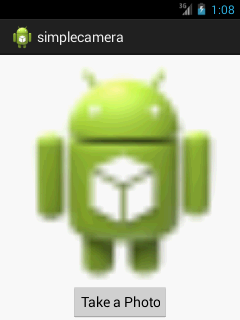
OUTPUT :