Introduction
Android Componets
UserInterface
Advanced UI
Data Storage
Advanced Concepts
Others
New Studio
- Android User Interface
- 4.1 Menus
- -- Option Menu ( Mega )
- -- Context Menu ( Mega )
- -- Popup Menu ( Mega )
- 4.2 Dialog ( Mega )
- -- AlertDialog ( Mega )
- -- ProgressDialog ( Mega )
- -- DatePicker ( Mega )
- -- TimePicker ( Mega )
- 4.4 Multimedia ( Mega )
- -- ImageView ( Nano )
- -- ImageButton ( Nano )
- -- Camera ( Mega )
- -- Audio ( Mega )
- -- Video ( Mega )
- 4.5 Shared Intent ( Mega )
Android ProgressBar
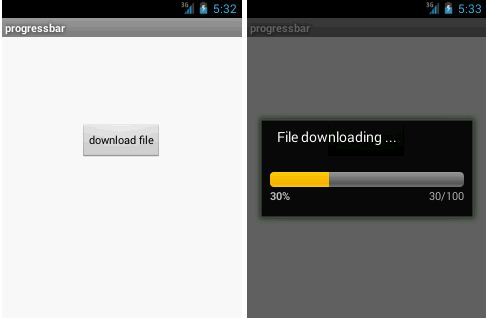
- We can display the android progress bar dialog box to display the status of work being done e.g. downloading file, analyzing status of work etc.
- In this example, we are displaying the progress dialog for dummy file download operation.
- Here we are using android.app.ProgressDialog class to show the progress bar.
- Android ProgressDialog is the subclass of AlertDialog class.
- The ProgressDialog class provides methods to work on progress bar like setProgress(), setMessage(), setProgressStyle(), setMax(), show() etc. The progress range of Progress Dialog is 0 to 10000.
Android Progress Bar Example by ProgressDialog
1. activity_main.xml
File:activity_main.xml
<RelativeLayout xmlns:androclass="http://schemas.android.com/apk/res/android"
    xmlns:tools="http://schemas.android.com/tools"
    android:layout_width="match_parent"
    android:layout_height="match_parent"
    tools:context=".MainActivity" >

    <Button
        android:id="@+id/button1"
        android:layout_width="wrap_content"
        android:layout_height="wrap_content"
        android:layout_alignParentTop="true"
        android:layout_centerHorizontal="true"
        android:layout_marginTop="116dp"
        android:text="download file" />

</RelativeLayout>
2. Activity class
It displays the popup menu on button click.File:
MainActivity.java
import android.app.Activity;
import android.app.ProgressDialog;
import android.os.Bundle;
import android.os.Handler;
import android.widget.Button;
import android.view.Menu;
import android.view.View;
import android.view.View.OnClickListener;
public class MainActivity extends Activity {
    Button btnStartProgress;
    ProgressDialog progressBar;
    private int progressBarStatus = 0;
    private Handler progressBarHandler = new Handler();
        private long fileSize = 0;
    @Override
    protected void onCreate(Bundle savedInstanceState) {
        super.onCreate(savedInstanceState);
        setContentView(R.layout.activity_main);
        addListenerOnButtonClick();
    }
    public void addListenerOnButtonClick() {
        btnStartProgress = (Button) findViewById(R.id.button1);
        btnStartProgress.setOnClickListener(new OnClickListener(){

           @Override
           public void onClick(View v) {
            // creating progress bar dialog
            progressBar = new ProgressDialog(v.getContext());
            progressBar.setCancelable(true);
            progressBar.setMessage("File downloading ...");
            progressBar.setProgressStyle(ProgressDialog.STYLE_HORIZONTAL);
            progressBar.setProgress(0);
            progressBar.setMax(100);
            progressBar.show();
            //reset progress bar and filesize status
            progressBarStatus = 0;
            fileSize = 0;

            new Thread(new Runnable() {
              public void run() {
                while (progressBarStatus < 100) {
                  // performing operation
                  progressBarStatus = doOperation();
                  try {Thread.sleep(1000);} catch (InterruptedException e) {e.printStackTrace();}
                  // Updating the progress bar
                  progressBarHandler.post(new Runnable() {
                    public void run() {
                      progressBar.setProgress(progressBarStatus);
                    }
                  });
                }
                // performing operation if file is downloaded,
                if (progressBarStatus >= 100) {
                    // sleeping for 1 second after operation completed
                    try {Thread.sleep(1000);} catch (InterruptedException e) {e.printStackTrace();}
                    // close the progress bar dialog
                    progressBar.dismiss();
                }
              }
             }).start();
            }//end of onClick method
          });
         }
    // checking how much file is downloaded and updating the filesize
    public int doOperation() {
        //The range of ProgressDialog starts from 0 to 10000
        while (fileSize <= 10000) {
            fileSize++;
            if (fileSize == 1000) {
                return 10;
            } else if (fileSize == 2000) {
                return 20;
            } else if (fileSize == 3000) {
                return 30;
            } else if (fileSize == 4000) {
            return 40;//you can add more else if
            } else{
                return 100;
            }
        }//end of while
        return 100;
    }//end of doOperation

    @Override
    public boolean onCreateOptionsMenu(Menu menu) {
        // Inflate the menu; this adds items to the action bar if it is present.
        getMenuInflater().inflate(R.menu.main, menu);
        return true;
    }
}
OUTPUT :