Introduction
Android Componets
UserInterface
Advanced UI
Data Storage
Advanced Concepts
Others
New Studio
- Android Components
- 2.1 Activity
- 2.2 Android Services
- 2.3 Broadcast Receiver
- 2.4 Content Provider
Broadcast Receivers
Broadcast Receivers simply respond to broadcast messages from other applications or from the system itself. These messages are sometime called events or intents.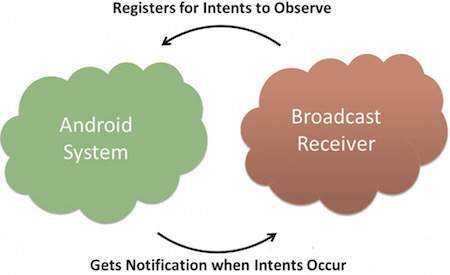
Working with Broadcast Receiver :
- Creating the Broadcast Receiver
- Registering Broadcast Receiver
1. Creating the Broadcast Receiver :
A broadcast receiver is implemented as a subclass of BroadcastReceiver class and overriding the onReceive() method where each message is received as a Intent object parameter.
public class MyReceiver extends BroadcastReceiver {
   @Override
   public void onReceive(Context context, Intent intent) {
      Toast.makeText(context, "Intent Detected.", Toast.LENGTH_LONG).show();
   }
}
2. Registering Broadcast Receiver :
An application listens for specific broadcast intents by registering a broadcast receiver in AndroidManifest.xml file. Consider we are going to register MyReceiver for system generated eventACTION_BOOT_COMPLETED which is fired by the system once the Android system has completed the boot process.File:
AndroidManifeast.xml
<application
   android:icon="@drawable/ic_launcher"
   android:label="@string/app_name"
   android:theme="@style/AppTheme" >
<uses-permission
      android:name="android.permission.RECEIVE_BOOT_COMPLETED" />
   <receiver android:name="MyReceiver">

      <intent-filter>
         <action android:name="android.intent.action.BOOT_COMPLETED">
         </action>
      </intent-filter>

   </receiver>
</application>
Example - 1 : Detecting Power Connected
File:AndroidManifeast.xml
<application>
.
.
.
.
.
<receiver android:name=".MyReceiver" >
            <intent-filter>
                <action android:name="android.intent.action.ACTION_POWER_CONNECTED" >
                </action>
            </intent-filter>
        </receiver>
</application>
File: MyReceiver.java
import android.content.BroadcastReceiver;
import android.content.Context;
import android.content.Intent;
import android.widget.Toast;

public class MyReceiver extends BroadcastReceiver {
	@Override
	public void onReceive(Context context, Intent intent) {
		Toast.makeText(context, "BroadcastReceiver is detected.", Toast.LENGTH_LONG).show();
	}
}
The following list is only a small sample of all available events.
| Event | Usage |
| Intent.ACTION_BATTERY_LOW | The battery level has fallen below a threshold |
| Intent.ACTION_BOOT_COMPLETED | Android is up and running |
| Intent.ACTION_DEVICE_STORAGE_LOW | Storage space on the device is getting limited |
| Intent.ACTION_HEADSET_PLUG | A headset was plugged in or a previously plugged headset was removed |
| Intent.ACTION_PACKAGE_ADDED | A new app has been installed |
| Intent.ACTION_POWER_CONNECTED | The device has been plugged in |
For some events you need to have the appropriate permissions. For example your app needs the permission
android.permission.RECEIVE_BOOT_COMPLETED if you want to be notified of the Intent.ACTION_BOOT_COMPLETED event.
File: AndroidManifeast.xml
<uses-permission
      android:name="android.permission.RECEIVE_BOOT_COMPLETED" />