Introduction
Android Componets
UserInterface
Advanced UI
Data Storage
Advanced Concepts
Others
New Studio
- Android Components
- 2.1 Activity
- 2.2 Android Services
- 2.3 Broadcast Receiver
- 2.4 Content Provider
When is smart to use bindService() and when startService()?
You usually usebindService() if your calling component(Activity) will need to communicate with the Service that you are starting, through the ServiceConnection. If you do no want to communicate with the Service you can use just startService().
Started
A service is started when an application component (such as an activity) starts it by calling
Bound
A service is bound when an application component binds to it by
A service is started when an application component (such as an activity) starts it by calling
startService(). Once started, a service can run in the background indefinitely(no specific time), even if the component that started it is destroyed. Usually, a started service performs a single operation and does not return a result to the caller. For example, it might download or upload a file over the network. When the operation is done, the service should stop itself.Bound
A service is bound when an application component binds to it by
calling bindService(). A bound service offers a client-server interface that allows components to interact with the service, send requests, get results, and even do so across processes with interprocess communication (IPC). A bound service runs only as long as another application component is bound to it. Multiple components can bind to the service at once, but when all of them unbind, the service is destroyed.
Android Service Tutorial
- Android service is a component that is used to perform operations on the background such as playing music, handle network transactions, interacting content providers etc.
- It doesn't has any UI (user interface).
- The service runs in the background indefinitely even if application is destroyed.
- Moreover, service can be bounded by a component to perform interactivity.
- Android service is not a thread or separate process.
Life Cycle of Android Service
There can be two forms of a service.The lifecycle of service can follow two different paths:- Started
- Bound
1) Started Service
- A service is started when component (like activity) calls startService() method, now it runs in the background indefinitely.
- It is stopped by stopService() method.
- The service can stop itself by calling the stopSelf() method.
2) Bound Service
- A service is bound when another component (e.g. client) calls bindService() method.
- The client can unbind the service by calling the unbindService() method.

Understanding Started and Bound Service by background music example
Suppose, I want to play music in the background, so call startService() method. But I want to get information of the current song being played, I will bind the service that provides information about the current song.Android Service Example
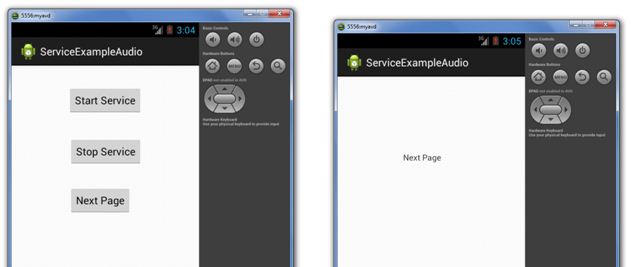
Let's see the example of service in android that plays an audio in the background. Audio will not be stopped even if you switch to another activity. To stop the audio, you need to stop the service.File:
activity_service_ex.xml
<RelativeLayout xmlns:android="http://schemas.android.com/apk/res/android"
    xmlns:tools="http://schemas.android.com/tools"
    android:layout_width="match_parent"
    android:layout_height="match_parent"
    android:paddingBottom="@dimen/activity_vertical_margin"
    android:paddingLeft="@dimen/activity_horizontal_margin"
    android:paddingRight="@dimen/activity_horizontal_margin"
    android:paddingTop="@dimen/activity_vertical_margin"
    tools:context=".MainActivity" >

    <Button
        android:id="@+id/buttonStart"
        android:layout_width="wrap_content"
        android:layout_height="wrap_content"
        android:layout_alignParentTop="true"
        android:layout_centerHorizontal="true"
        android:layout_marginTop="19dp"
        android:text="Start Service" />

    <Button
        android:id="@+id/buttonStop"
        android:layout_width="wrap_content"
        android:layout_height="wrap_content"
        android:layout_above="@+id/buttonNext"
        android:layout_alignRight="@+id/buttonStart"
        android:layout_marginBottom="35dp"
        android:text="Stop Service" />

    <Button
        android:id="@+id/buttonNext"
        android:layout_width="wrap_content"
        android:layout_height="wrap_content"
        android:layout_alignLeft="@+id/buttonStop"
        android:layout_centerVertical="true"
        android:text="Next Page" />

</RelativeLayout>
File: activity_next.xml
<RelativeLayout xmlns:android="http://schemas.android.com/apk/res/android"
    xmlns:tools="http://schemas.android.com/tools"
    android:layout_width="match_parent"
    android:layout_height="match_parent"
    android:paddingBottom="@dimen/activity_vertical_margin"
    android:paddingLeft="@dimen/activity_horizontal_margin"
    android:paddingRight="@dimen/activity_horizontal_margin"
    android:paddingTop="@dimen/activity_vertical_margin"
    tools:context=".MainActivity" >

    <TextView
        android:id="@+id/textView1"
        android:layout_width="wrap_content"
        android:layout_height="wrap_content"
        android:layout_alignParentLeft="true"
        android:layout_alignParentTop="true"
        android:layout_marginLeft="96dp"
        android:layout_marginTop="112dp"
        android:text="Next Page" />

</RelativeLayout>
File: MyService.java
import android.app.Service;
import android.content.Intent;
import android.media.MediaPlayer;
import android.os.IBinder;
import android.widget.Toast;
public class MyService extends Service {
 MediaPlayer myPlayer;
 @Override
 public IBinder onBind(Intent intent) {
  return null;
 }
 @Override
 public void onCreate() {
  Toast.makeText(this, "Service Created", Toast.LENGTH_LONG).show();

  myPlayer = MediaPlayer.create(this, R.raw.sun);
  myPlayer.setLooping(false); // Set looping
 }
 @Override
 public void onStart(Intent intent, int startid) {
  Toast.makeText(this, "Service Started", Toast.LENGTH_LONG).show();
  myPlayer.start();
 }
 @Override
 public void onDestroy() {
  Toast.makeText(this, "Service Stopped", Toast.LENGTH_LONG).show();
  myPlayer.stop();
 }
}
File: ServiceExActivity.java
import android.app.Activity;
import android.content.Intent;
import android.os.Bundle;
import android.view.View;
import android.view.View.OnClickListener;
import android.widget.Button;

public class ServiceExActivity extends Activity{
	Button buttonStart, buttonStop,buttonNext;
	@Override
	public void onCreate(Bundle savedInstanceState) {
		super.onCreate(savedInstanceState);
		setContentView(R.layout.activity_service_ex);

		buttonStart = (Button) findViewById(R.id.buttonStart);
		buttonStop = (Button) findViewById(R.id.buttonStop);
		buttonNext = (Button) findViewById(R.id.buttonNext);
		buttonStart.setOnClickListener(new OnClickListener() {
			@Override
			public void onClick(View v) {
				startService(new Intent(ServiceExActivity.this, MyService.class));
			}
		});
		buttonStop.setOnClickListener(new OnClickListener() {
			@Override
			public void onClick(View v) {
				stopService(new Intent(ServiceExActivity.this, MyService.class));
			}
		});
		buttonNext.setOnClickListener(new OnClickListener() {
			@Override
			public void onClick(View v) {
				Intent intent=new Intent(ServiceExActivity.this,NextPage.class);
				startActivity(intent);
			}
		});
	}
}
File: NextPage.java
import android.app.Activity;
import android.os.Bundle;

public class NextPage extends Activity {
 @Override
 public void onCreate(Bundle savedInstanceState) {
  super.onCreate(savedInstanceState);
  setContentView(R.layout.activity_next);
 }
}
Declare the Service in the AndroidManifest.xml file
File:AndroidManifest.xml
<?xml version="1.0" encoding="utf-8"?>
<manifest xmlns:android="http://schemas.android.com/apk/res/android"
    package="com.example.serviceexampleaudio"
    android:versionCode="1"
    android:versionName="1.0" >

    <uses-sdk
        android:minSdkVersion="8"
        android:targetSdkVersion="17" />

    <application
        android:allowBackup="true"
        android:icon="@drawable/ic_launcher"
        android:label="@string/app_name"
        android:theme="@style/AppTheme" >
        <activity
            android:name="com.example.serviceexampleaudio.MainActivity"
            android:label="@string/app_name" >
            <intent-filter>
                <action android:name="android.intent.action.MAIN" />

                <category android:name="android.intent.category.LAUNCHER" />
            </intent-filter>
        </activity>

        <service
            android:name=".MyService"
            android:enabled="true" />
         <activity
            android:name=".NextPage"/>
    </application>

</manifest>
OUTPUT :