Introduction
Android Componets
UserInterface
Advanced UI
Data Storage
Advanced Concepts
Others
New Studio
Android Fragments
- Android Fragment is the part of activity, it is also known as sub-activity. There can be more than one fragment in an activity. Fragments represent multiple screen inside one activity.
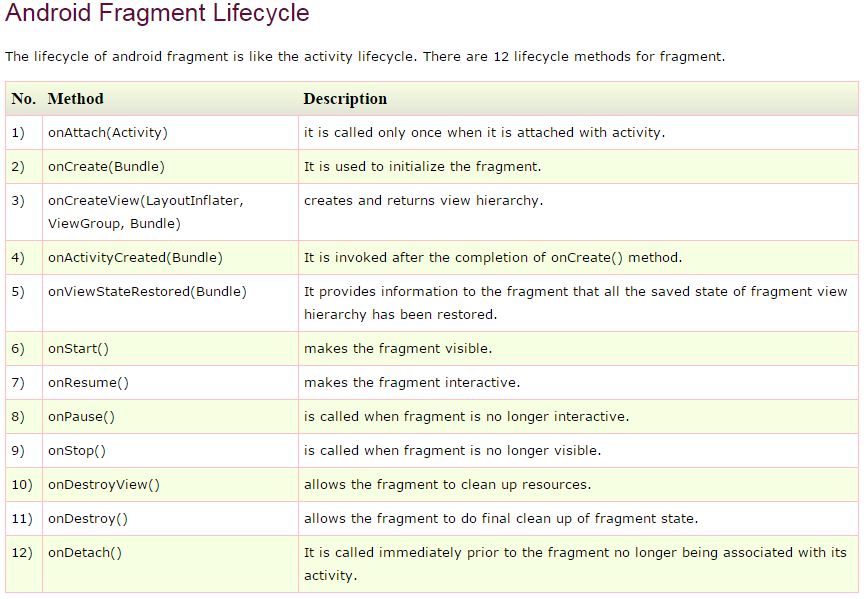
- Android fragment lifecycle is affected by activity lifecycle because fragments are included in activity.
- Each fragment has its own life cycle methods that is affected by activity life cycle because fragments are embedded in activity.
- The FragmentManager class is responsible to make interaction between fragment objects.
Android Fragment Example
File:activity_main.xml
<LinearLayout xmlns:android="http://schemas.android.com/apk/res/android"
    android:layout_width="fill_parent"
    android:layout_height="fill_parent" >

    <fragment
        android:id="@+id/fragment2"
        android:name="com.example.fragmentexample.Fragment2"
        android:layout_width="0px"
        android:layout_height="match_parent"
        android:layout_weight="1"
        />

    <fragment
        android:id="@+id/fragment1"
        android:name="com.example.fragmentexample.Fragment1"
        android:layout_width="0px"
        android:layout_height="match_parent"
        android:layout_weight="1"
         />

</LinearLayout>
File: fragment1.xml
<?xml version="1.0" encoding="utf-8"?>
<LinearLayout xmlns:android="http://schemas.android.com/apk/res/android"
    android:layout_width="match_parent"
    android:layout_height="match_parent"
    android:orientation="vertical"
    android:background="#00ff00"
     >

    <TextView
        android:id="@+id/textView1"
        android:layout_width="wrap_content"
        android:layout_height="wrap_content"
        android:text="fragment frist"
        android:textAppearance="?android:attr/textAppearanceLarge" />

</LinearLayout>
File: fragment2.xml
<?xml version="1.0" encoding="utf-8"?>
<LinearLayout xmlns:android="http://schemas.android.com/apk/res/android"
    android:layout_width="match_parent"
    android:layout_height="match_parent"
    android:orientation="vertical"
    android:background="#0000ff"
     >

    <TextView
        android:id="@+id/textView1"
        android:layout_width="wrap_content"
        android:layout_height="wrap_content"
        android:text="Second Fragment"
        android:textAppearance="?android:attr/textAppearanceLarge" />

</LinearLayout>
File: MainActivity.java
import android.os.Bundle;
import android.app.Activity;
import android.view.Menu;
public class MainActivity extends Activity {

    @Override
    protected void onCreate(Bundle savedInstanceState) {
        super.onCreate(savedInstanceState);
        setContentView(R.layout.activity_main);
    }
}
File: Fragment1.java
import android.app.Fragment;
import android.os.Bundle;
import android.view.LayoutInflater;
import android.view.View;
import android.view.ViewGroup;

public class Fragment1 extends Fragment {
    @Override
    public View onCreateView(LayoutInflater inflater, ViewGroup container,
            Bundle savedInstanceState) {
        // TODO Auto-generated method stub
        return inflater.inflate(R.layout.fragment1,container, false);
    }

}
File: Fragment2.java
import android.app.Fragment;
import android.os.Bundle;
import android.view.LayoutInflater;
import android.view.View;
import android.view.ViewGroup;

public class Fragment2 extends Fragment {

    public View onCreateView(LayoutInflater inflater, ViewGroup container,
            Bundle savedInstanceState) {
        // TODO Auto-generated method stub
        return inflater.inflate(R.layout.fragment2,container, false);
    }

}
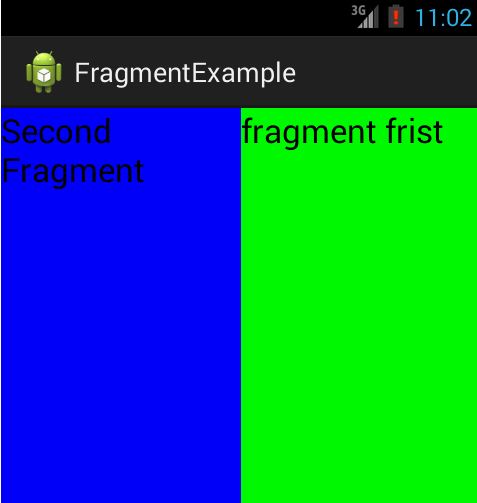
OUTPUT