Introduction
Android Componets
UserInterface
Advanced UI
Data Storage
Advanced Concepts
Others
New Studio
Android TelephonyManager Tutorial
The android.telephony.TelephonyManager class provides information about the telephony services such as subscriber id, sim serial number, phone network type etc. Moreover, you can determine the phone state etc.Android TelephonyManager Example
Let's see the simple example of TelephonyManager that prints information of the telephony services.File:
activity_main.xml
<RelativeLayout xmlns:android="http://schemas.android.com/apk/res/android"
    xmlns:tools="http://schemas.android.com/tools"
    android:layout_width="match_parent"
    android:layout_height="match_parent"
    android:paddingBottom="@dimen/activity_vertical_margin"
    android:paddingLeft="@dimen/activity_horizontal_margin"
    android:paddingRight="@dimen/activity_horizontal_margin"
    android:paddingTop="@dimen/activity_vertical_margin"
    tools:context=".MainActivity" >

    <TextView
        android:id="@+id/textView1"
        android:layout_width="wrap_content"
        android:layout_height="wrap_content"
        android:layout_alignParentLeft="true"
        android:layout_alignParentTop="true"
        android:layout_marginLeft="38dp"
        android:layout_marginTop="30dp"
        android:text="Phone Details:" />

</RelativeLayout>
Now, write the code to display the information about the telephony services.File:
MainActivity.java
import android.os.Bundle;
import android.app.Activity;
import android.content.Context;
import android.telephony.TelephonyManager;
import android.view.Menu;
import android.widget.TextView;

public class MainActivity extends Activity {
   TextView textView1;
    @Override
    protected void onCreate(Bundle savedInstanceState) {
        super.onCreate(savedInstanceState);
        setContentView(R.layout.activity_main);

        textView1=(TextView)findViewById(R.id.textView1);

        //Get the instance of TelephonyManager
        TelephonyManager  tm=(TelephonyManager)getSystemService(Context.TELEPHONY_SERVICE);

        //Calling the methods of TelephonyManager the returns the information
        String IMEINumber=tm.getDeviceId();
        String subscriberID=tm.getDeviceId();
        String SIMSerialNumber=tm.getSimSerialNumber();
        String networkCountryISO=tm.getNetworkCountryIso();
        String SIMCountryISO=tm.getSimCountryIso();
        String softwareVersion=tm.getDeviceSoftwareVersion();
        String voiceMailNumber=tm.getVoiceMailNumber();

        //Get the phone type
        String strphoneType="";

        int phoneType=tm.getPhoneType();

        switch (phoneType)
        {
                case (TelephonyManager.PHONE_TYPE_CDMA):
                           strphoneType="CDMA";
                               break;
                case (TelephonyManager.PHONE_TYPE_GSM):
                           strphoneType="GSM";
                               break;
                case (TelephonyManager.PHONE_TYPE_NONE):
                            strphoneType="NONE";
                                break;
         }

        //getting information if phone is in roaming
        boolean isRoaming=tm.isNetworkRoaming();

        String info="Phone Details:\n";
        info+="\n IMEI Number:"+IMEINumber;
        info+="\n SubscriberID:"+subscriberID;
        info+="\n Sim Serial Number:"+SIMSerialNumber;
        info+="\n Network Country ISO:"+networkCountryISO;
        info+="\n SIM Country ISO:"+SIMCountryISO;
        info+="\n Software Version:"+softwareVersion;
        info+="\n Voice Mail Number:"+voiceMailNumber;
        info+="\n Phone Network Type:"+strphoneType;
        info+="\n In Roaming? :"+isRoaming;

        textView1.setText(info);//displaying the information in the textView
    }


}
AndroidManifest.xml
You need to provide READ_PHONE_STATE permission in the AndroidManifest.xml file.File:
AndroidManifest.xml
<?xml version="1.0" encoding="utf-8"?>
<manifest xmlns:androclass="http://schemas.android.com/apk/res/android"
    package="com.javatpoint.telephonymanager"
    android:versionCode="1"
    android:versionName="1.0" >

    <uses-sdk
        android:minSdkVersion="8"
        android:targetSdkVersion="17" />

    <uses-permission android:name="android.permission.READ_PHONE_STATE"/>

    <application
        android:allowBackup="true"
        android:icon="@drawable/ic_launcher"
        android:label="@string/app_name"
        android:theme="@style/AppTheme" >
        <activity
            android:name="com.javatpoint.telephonymanager.MainActivity"
            android:label="@string/app_name" >
            <intent-filter>
                <action android:name="android.intent.action.MAIN" />

                <category android:name="android.intent.category.LAUNCHER" />
            </intent-filter>
        </activity>
    </application>

</manifest>
OUTPUT :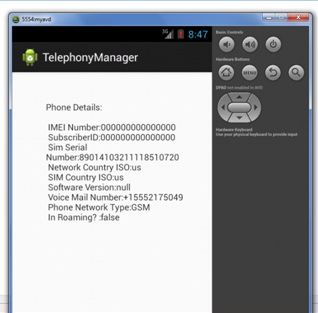
How to make a phone call in android
We are able to make a phone call in android via intent. You need to write only three lines of code to make a phone call.Android provides Built-in applications for phone calls, in some occasions we may need to make a phone call through our application. This could easily be done by using implicit Intent with appropriate actions.
Intent Object - Action to make Phone Call
You will use ACTION_CALL action to trigger built-in phone call functionality available in Android device.
Intent phoneIntent = new Intent(Intent.ACTION_CALL);
To make a phone call at a given number 91-000-000-0000, you need to specify tel: as URI using setData() method as follows
phoneIntent.setData(Uri.parse("tel:91-000-000-0000"));
Intent callIntent = new Intent(Intent.ACTION_CALL);
callIntent.setData(Uri.parse("tel:8465984320"));//change the number
startActivity(callIntent);
Example of phone call in android
File:activity_main.xml
<RelativeLayout xmlns:android="http://schemas.android.com/apk/res/android"
    xmlns:tools="http://schemas.android.com/tools"
    android:layout_width="match_parent"
    android:layout_height="match_parent"
    tools:context=".MainActivity" >

    <Button
        android:id="@+id/button1"
        android:layout_width="wrap_content"
        android:layout_height="wrap_content"
        android:layout_alignParentTop="true"
        android:layout_centerHorizontal="true"
        android:layout_marginTop="118dp"
        android:text="Call" />

    <EditText
        android:id="@+id/editText1"
        android:layout_width="wrap_content"
        android:layout_height="wrap_content"
        android:layout_alignParentTop="true"
        android:layout_centerHorizontal="true"
        android:layout_marginTop="25dp"
        android:ems="10" />

</RelativeLayout>
Write the permission code in Android-Manifest.xml file You need to write CALL_PHONE permission as given below:
<uses-permission android:name="android.permission.CALL_PHONE" />
File: Android-Manifest.xml
<?xml version="1.0" encoding="utf-8"?>

<manifest xmlns:androclass="http://schemas.android.com/apk/res/android"
    package="com.example.phonecall"
    android:versionCode="1"
    android:versionName="1.0" >

    <uses-sdk
        android:minSdkVersion="8"
        android:targetSdkVersion="16" />

    <uses-permission android:name="android.permission.CALL_PHONE" />
    <application
        android:allowBackup="true"
        android:icon="@drawable/ic_launcher"
        android:label="@string/app_name"
        android:theme="@style/AppTheme" >
        <activity
            android:name="com.example.phonecall.MainActivity"
            android:label="@string/app_name" >
            <intent-filter>
                <action android:name="android.intent.action.MAIN" />

                <category android:name="android.intent.category.LAUNCHER" />
            </intent-filter>
        </activity>
    </application>

</manifest>
File: MainActivity.java
import android.net.Uri;
import android.os.Bundle;
import android.app.Activity;
import android.content.Intent;
import android.view.Menu;
import android.view.View;
import android.view.View.OnClickListener;
import android.widget.Button;
import android.widget.EditText;

public class MainActivity extends Activity {
    EditText edittext1;
    Button button1;
    @Override
    protected void onCreate(Bundle savedInstanceState) {
        super.onCreate(savedInstanceState);
        setContentView(R.layout.activity_main);

        //Getting the edittext and button instance
        edittext1=(EditText)findViewById(R.id.editText1);
        button1=(Button)findViewById(R.id.button1);

        //Performing action on button click
        button1.setOnClickListener(new OnClickListener(){

            @Override
            public void onClick(View arg0) {
                String number=edittext1.getText().toString();
                Intent callIntent = new Intent(Intent.ACTION_CALL);
                callIntent.setData(Uri.parse("tel:"+number));
                startActivity(callIntent);
            }

        });
    }

    @Override
    public boolean onCreateOptionsMenu(Menu menu) {
        // Inflate the menu; this adds items to the action bar if it is present.
        getMenuInflater().inflate(R.menu.activity_main, menu);
        return true;
    }

}
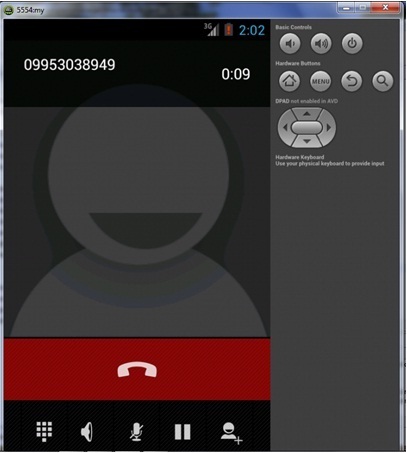
OUTPUT :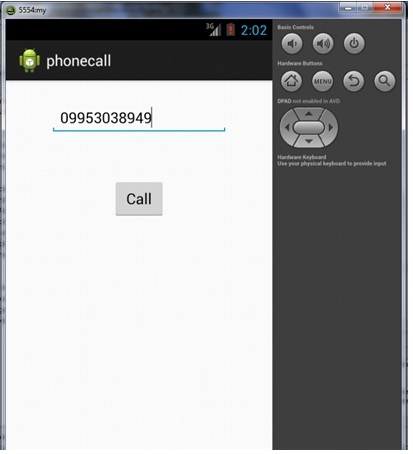
How to send sms in android
We can send sms in android via intent. You need to write only 4 lines of code the send sms in android.
//Getting intent and PendingIntent instance
Intent intent=new Intent(getApplicationContext(),MainActivity.class);
PendingIntent pi=PendingIntent.getActivity(getApplicationContext(), 0, intent,0);

//Get the SmsManager instance and call the sendTextMessage method to send message
SmsManager sms=SmsManager.getDefault();
sms.sendTextMessage("8465984320", null, "hello javatpoint", pi,null);
Example of sending sms in android
File:activity_main.xml
<RelativeLayout xmlns:android="http://schemas.android.com/apk/res/android"
    xmlns:tools="http://schemas.android.com/tools"
    android:layout_width="match_parent"
    android:layout_height="match_parent"
    tools:context=".MainActivity" >

    <EditText
        android:id="@+id/editText1"
        android:layout_width="wrap_content"
        android:layout_height="wrap_content"
        android:layout_alignParentRight="true"
        android:layout_alignParentTop="true"
        android:layout_marginRight="20dp"
        android:ems="10" />

    <EditText
        android:id="@+id/editText2"
        android:layout_width="wrap_content"
        android:layout_height="wrap_content"
        android:layout_alignLeft="@+id/editText1"
        android:layout_below="@+id/editText1"
        android:layout_marginTop="26dp"
        android:ems="10"
        android:inputType="textMultiLine" />

    <TextView
        android:id="@+id/textView1"
        android:layout_width="wrap_content"
        android:layout_height="wrap_content"
        android:layout_alignBaseline="@+id/editText1"
        android:layout_alignBottom="@+id/editText1"
        android:layout_toLeftOf="@+id/editText1"
        android:text="Mobile No:" />

    <TextView
        android:id="@+id/textView2"
        android:layout_width="wrap_content"
        android:layout_height="wrap_content"
        android:layout_alignBaseline="@+id/editText2"
        android:layout_alignBottom="@+id/editText2"
        android:layout_alignLeft="@+id/textView1"
        android:text="Message:" />

    <Button
        android:id="@+id/button1"
        android:layout_width="wrap_content"
        android:layout_height="wrap_content"
        android:layout_alignLeft="@+id/editText2"
        android:layout_below="@+id/editText2"
        android:layout_marginLeft="34dp"
        android:layout_marginTop="48dp"
        android:text="Send SMS" />

</RelativeLayout>
Write the permission code in Android-Manifest.xml file
You need to write SEND_SMS permission as given below:
<uses-permission android:name="android.permission.SEND_SMS"/>
File: Android-Manifest.xml
<?xml version="1.0" encoding="utf-8"?>
<manifest
xmlns:androclass="http://schemas.android.com/apk/res/android"
    package="com.example.sendsms"
    android:versionCode="1"
    android:versionName="1.0" >

    <uses-sdk
        android:minSdkVersion="8"
        android:targetSdkVersion="16" />

    <uses-permission android:name="android.permission.SEND_SMS"/>

    <uses-permission android:name="android.permission.RECEIVE_SMS"/>

    <application
        android:allowBackup="true"
        android:icon="@drawable/ic_launcher"
        android:label="@string/app_name"
        android:theme="@style/AppTheme" >
        <activity
            android:name="com.example.sendsms.MainActivity"
            android:label="@string/app_name" >
            <intent-filter>
                <action android:name="android.intent.action.MAIN" />

                <category android:name="android.intent.category.LAUNCHER" />
            </intent-filter>
        </activity>
    </application>

</manifest>
Let's write the code to make the phone call via intent.File:
MainActivity.java
import android.os.Bundle;
import android.app.Activity;
import android.app.PendingIntent;
import android.content.Intent;
import android.telephony.SmsManager;
import android.view.Menu;
import android.view.View;
import android.view.View.OnClickListener;
import android.widget.Button;
import android.widget.EditText;
import android.widget.Toast;

public class MainActivity extends Activity {

    EditText mobileno,message;
    Button sendsms;
    @Override
    protected void onCreate(Bundle savedInstanceState) {
        super.onCreate(savedInstanceState);
        setContentView(R.layout.activity_main);

        mobileno=(EditText)findViewById(R.id.editText1);
        message=(EditText)findViewById(R.id.editText2);
        sendsms=(Button)findViewById(R.id.button1);

    //Performing action on button click
        sendsms.setOnClickListener(new OnClickListener() {

            @Override
            public void onClick(View arg0) {
                String no=mobileno.getText().toString();
                String msg=message.getText().toString();

                //Getting intent and PendingIntent instance
                Intent intent=new Intent(getApplicationContext(),MainActivity.class);
                PendingIntent pi=PendingIntent.getActivity(getApplicationContext(), 0, intent,0);

                //Get the SmsManager instance and call the sendTextMessage method to send message
                SmsManager sms=SmsManager.getDefault();
                sms.sendTextMessage(no, null, msg, pi,null);

                Toast.makeText(getApplicationContext(), "Message Sent successfully!",
                    Toast.LENGTH_LONG).show();
            }
        });
    }

    @Override
    public boolean onCreateOptionsMenu(Menu menu) {
        // Inflate the menu; this adds items to the action bar if it is present.
        getMenuInflater().inflate(R.menu.activity_main, menu);
        return true;
    }

}
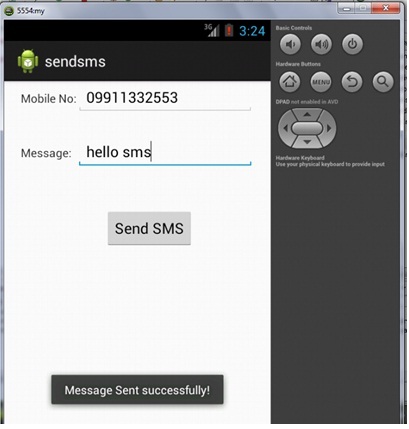
OUTPUT :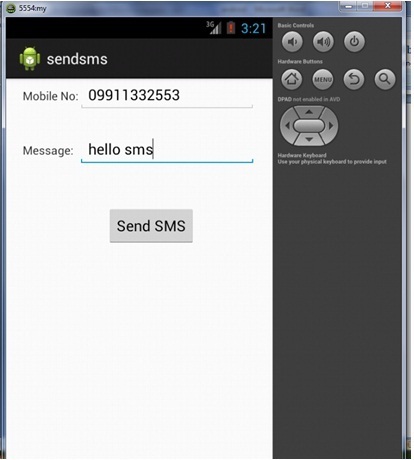
How to send email in android using intent
We can easily send email in android via intent. You need to write few lines of code only as given below
Intent email = new Intent(Intent.ACTION_SEND);
email.putExtra(Intent.EXTRA_EMAIL, new String[]{ to});
email.putExtra(Intent.EXTRA_SUBJECT, subject);
email.putExtra(Intent.EXTRA_TEXT, message);

//need this to prompts email client only
email.setType("message/rfc822");

startActivity(Intent.createChooser(email, "Choose an Email client :"));
Example of phone call in android
File:activity_main.xml
<RelativeLayout xmlns:android="http://schemas.android.com/apk/res/android"
    xmlns:tools="http://schemas.android.com/tools"
    android:layout_width="match_parent"
    android:layout_height="match_parent"
    tools:context=".MainActivity" >

    <EditText
        android:id="@+id/editText1"
        android:layout_width="wrap_content"
        android:layout_height="wrap_content"
        android:layout_alignParentRight="true"
        android:layout_alignParentTop="true"
        android:layout_marginRight="22dp"
        android:layout_marginTop="16dp"
        android:ems="10" />

    <EditText
        android:id="@+id/editText2"
        android:layout_width="wrap_content"
        android:layout_height="wrap_content"
        android:layout_alignLeft="@+id/editText1"
        android:layout_below="@+id/editText1"
        android:layout_marginTop="18dp"
        android:ems="10" >

        <requestFocus />
    </EditText>

    <EditText
        android:id="@+id/editText3"
        android:layout_width="wrap_content"
        android:layout_height="wrap_content"
        android:layout_alignLeft="@+id/editText2"
        android:layout_below="@+id/editText2"
        android:layout_marginTop="28dp"
        android:ems="10"
        android:inputType="textMultiLine" />

    <TextView
        android:id="@+id/textView1"
        android:layout_width="wrap_content"
        android:layout_height="wrap_content"
        android:layout_alignBaseline="@+id/editText1"
        android:layout_alignBottom="@+id/editText1"
        android:layout_alignParentLeft="true"
        android:text="To:" />

    <TextView
        android:id="@+id/textView2"
        android:layout_width="wrap_content"
        android:layout_height="wrap_content"
        android:layout_alignBaseline="@+id/editText2"
        android:layout_alignBottom="@+id/editText2"
        android:layout_alignParentLeft="true"
        android:text="Subject:" />

    <TextView
        android:id="@+id/textView3"
        android:layout_width="wrap_content"
        android:layout_height="wrap_content"
        android:layout_alignBaseline="@+id/editText3"
        android:layout_alignBottom="@+id/editText3"
        android:layout_alignParentLeft="true"
        android:text="Message:" />

    <Button
        android:id="@+id/button1"
        android:layout_width="wrap_content"
        android:layout_height="wrap_content"
        android:layout_alignLeft="@+id/editText3"
        android:layout_below="@+id/editText3"
        android:layout_marginLeft="76dp"
        android:layout_marginTop="20dp"
        android:text="Send" />

</RelativeLayout>
File: MainActivity.java
import android.os.Bundle;
import android.app.Activity;
import android.content.Intent;
import android.view.Menu;
import android.view.View;
import android.view.View.OnClickListener;
import android.widget.Button;
import android.widget.EditText;

public class MainActivity extends Activity {
    EditText editTextTo,editTextSubject,editTextMessage;
    Button send;
    @Override
    protected void onCreate(Bundle savedInstanceState) {
        super.onCreate(savedInstanceState);
        setContentView(R.layout.activity_main);

        editTextTo=(EditText)findViewById(R.id.editText1);
        editTextSubject=(EditText)findViewById(R.id.editText2);
        editTextMessage=(EditText)findViewById(R.id.editText3);

        send=(Button)findViewById(R.id.button1);

        send.setOnClickListener(new OnClickListener(){

            @Override
            public void onClick(View arg0) {
                 String to=editTextTo.getText().toString();
                 String subject=editTextSubject.getText().toString();
                 String message=editTextMessage.getText().toString();


                 Intent email = new Intent(Intent.ACTION_SEND);
                  email.putExtra(Intent.EXTRA_EMAIL, new String[]{ to});
                  email.putExtra(Intent.EXTRA_SUBJECT, subject);
                  email.putExtra(Intent.EXTRA_TEXT, message);

                  //need this to prompts email client only
                  email.setType("message/rfc822");

                  startActivity(Intent.createChooser(email, "Choose an Email client :"));

            }

        });
    }

    @Override
    public boolean onCreateOptionsMenu(Menu menu) {
        // Inflate the menu; this adds items to the action bar if it is present.
        getMenuInflater().inflate(R.menu.activity_main, menu);
        return true;
    }

}