Introduction
Android Componets
UserInterface
Advanced UI
Data Storage
Advanced Concepts
Others
New Studio
- Android User Interface
- 3.1 Introduction(Nano)
- 3.2 Layouts(Nano)
- -- LinearLayout(Nano)
- -- RelativeLayout(Nano)
- -- TableLayout(Mega)
- -- Frame Layout(Mega)
- --
Absolute Layout - -- Grid Layout(Mega)
- 3.3 UI Widgets (Nano)
- -- TextView(Nano)
- -- EditText(Nano)
- -- Button(Nano)
- -- Event Handler(Nano)
- -- Image Buttons(Nano)
- -- CheckBox(Nano)
- -- Dialog(Nano)
- -- RadioGroup & RadioButtons(Nano)
- -- Toast(Nano)
- -- RatingBar(Nano)
- -- SeekBar(Nano)
- -- ProgerssBar(Nano)
- -- ToggleButton(Nano)
- -- WebView(Nano)
- -- Spinner(Nano)
- -- Layout Inflator(Mega)
- -- ListView and Adapters(Mega)
- -- Gridview(Mega)
- 3.4 Android Resources(Nano)
- -- Resource Introduction(Nano)
- -- Animation Resources(Mega)
- -- Color State List Resource(Mega)
- -- Drawable Resources(Mega)
- -- Layout Resource(Nano)
- -- String Resources(Nano)
- -- Style Resource(Mega)
- -- Supporting Multiple Screens(Mega)
- -- Practises
Absolute Layout
An Absolute Layout lets you specify exact locations (x/y coordinates) of its children. You specify the exact x and y coordinates on the screen for each control.This is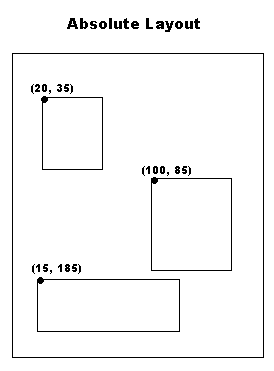
AbsoluteLayout Attributes
Following are the important attributes specific to AbsoluteLayout :
| Attribute | Description |
|---|---|
| android:id | This is the ID which uniquely identifies the layout. |
| android:layout_x | This specifies the x-coordinate of the view. |
| android:layout_y | This specifies the y-coordinate of the view. |
Example 1 :
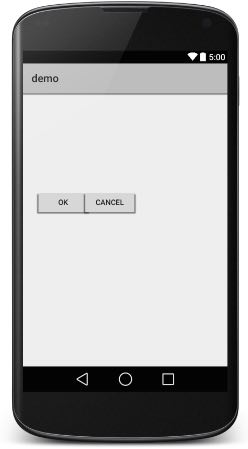
<AbsoluteLayout xmlns:android="http://schemas.android.com/apk/res/android"
   android:layout_width="fill_parent"
   android:layout_height="fill_parent">

   <Button
      android:layout_width="100dp"
      android:layout_height="wrap_content"
      android:text="OK"
      android:layout_x="50px"
      android:layout_y="361px" />
   <Button
      android:layout_width="100dp"
      android:layout_height="wrap_content"
      android:text="Cancel"
      android:layout_x="225px"
      android:layout_y="361px" />

</AbsoluteLayout>