Introduction
Android Componets
UserInterface
Advanced UI
Data Storage
Advanced Concepts
Others
New Studio
- Android User Interface
- 3.1 Introduction(Nano)
- 3.2 Layouts(Nano)
- -- LinearLayout(Nano)
- -- RelativeLayout(Nano)
- -- TableLayout(Mega)
- -- Frame Layout(Mega)
- --
Absolute Layout - -- Grid Layout(Mega)
- 3.3 UI Widgets (Nano)
- -- TextView(Nano)
- -- EditText(Nano)
- -- Button(Nano)
- -- Event Handler(Nano)
- -- Image Buttons(Nano)
- -- CheckBox(Nano)
- -- Dialog(Nano)
- -- RadioGroup & RadioButtons(Nano)
- -- Toast(Nano)
- -- RatingBar(Nano)
- -- SeekBar(Nano)
- -- ProgerssBar(Nano)
- -- ToggleButton(Nano)
- -- WebView(Nano)
- -- Spinner(Nano)
- -- Layout Inflator(Mega)
- -- ListView and Adapters(Mega)
- -- Gridview(Mega)
- 3.4 Android Resources(Nano)
- -- Resource Introduction(Nano)
- -- Animation Resources(Mega)
- -- Color State List Resource(Mega)
- -- Drawable Resources(Mega)
- -- Layout Resource(Nano)
- -- String Resources(Nano)
- -- Style Resource(Mega)
- -- Supporting Multiple Screens(Mega)
- -- Practises
Android Spinner
Spinner allows you to select an item from a drop down menu.For example. When you are using Gmail application you would get drop down menu as shown below, you need to select an item from a drop down menu.
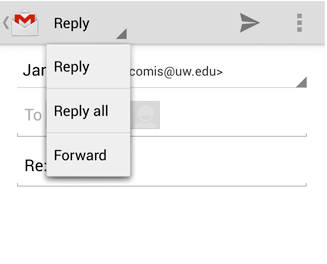
Example
This example demonstrates the category of computer courses, you need to select a category from the category.
Steps :
- Define all courses in
res/values/strings.xml<string-array name = "course_items"> <item>C</item> <item>C++</item> <item>Java</item> <item>.Net</item> <item>MySql</item> </string-array> - Add Spinner in
res/layout/activity_main.xml<?xml version="1.0" encoding="utf-8"?> <LinearLayout xmlns:android="http://schemas.android.com/apk/res/android" android:layout_width="match_parent" android:layout_height="match_parent" android:orientation="vertical" > <Spinner android:id="@+id/sp_courses" android:layout_width="match_parent" android:layout_height="wrap_content" android:entries="@array/course_items" /> <Button android:id="@+id/btn_submit" android:layout_width="match_parent" android:layout_height="wrap_content" android:text="Submit" /> </LinearLayout>android:entries represents the selection items in spinner. - Add code in
src/your app package/MainActivity.javapackage com.example.androidcollegeppt; import android.app.Activity; import android.os.Bundle; import android.view.View; import android.view.View.OnClickListener; import android.widget.Button; import android.widget.Spinner; import android.widget.Toast; public class Spinner_Demo extends Activity { Spinner sp_courses; Button btn_submit; @Override protected void onCreate(Bundle savedInstanceState) { super.onCreate(savedInstanceState); setContentView(R.layout.a_spinner_demo); sp_courses = (Spinner) findViewById(R.id.sp_courses); btn_submit = (Button) findViewById(R.id.btn_submit); btn_submit.setOnClickListener(new OnClickListener() { @Override public void onClick(View v) { Toast.makeText(getBaseContext(), sp_courses.getSelectedItem().toString(), Toast.LENGTH_SHORT).show(); } }); } }
