Introduction
Android Componets
UserInterface
Advanced UI
Data Storage
Advanced Concepts
Others
New Studio
- Android User Interface
- 3.1 Introduction(Nano)
- 3.2 Layouts(Nano)
- -- LinearLayout(Nano)
- -- RelativeLayout(Nano)
- -- TableLayout(Mega)
- -- Frame Layout(Mega)
- --
Absolute Layout - -- Grid Layout(Mega)
- 3.3 UI Widgets (Nano)
- -- TextView(Nano)
- -- EditText(Nano)
- -- Button(Nano)
- -- Event Handler(Nano)
- -- Image Buttons(Nano)
- -- CheckBox(Nano)
- -- Dialog(Nano)
- -- RadioGroup & RadioButtons(Nano)
- -- Toast(Nano)
- -- RatingBar(Nano)
- -- SeekBar(Nano)
- -- ProgerssBar(Nano)
- -- ToggleButton(Nano)
- -- WebView(Nano)
- -- Spinner(Nano)
- -- Layout Inflator(Mega)
- -- ListView and Adapters(Mega)
- -- Gridview(Mega)
- 3.4 Android Resources(Nano)
- -- Resource Introduction(Nano)
- -- Animation Resources(Mega)
- -- Color State List Resource(Mega)
- -- Drawable Resources(Mega)
- -- Layout Resource(Nano)
- -- String Resources(Nano)
- -- Style Resource(Mega)
- -- Supporting Multiple Screens(Mega)
- -- Practises
Relative Layout
Android RelativeLayout enables you to specify how child views are positioned relative to each other.
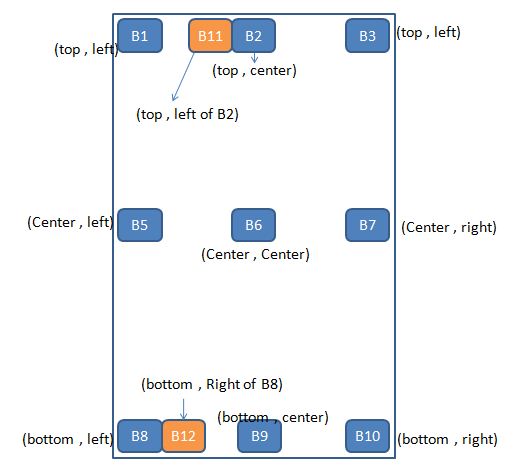
Using RelativeLayout, you can align two elements by right border, or make one below another, centered in the screen, centered left, and so on. By default, all child views are drawn at the top-left of the layout, so you must define the position of each view using the various layout properties.
| Attribute | Description |
|---|---|
| android:layout_alignParentBottom | If true, makes the bottom edge of this view match the bottom edge of the parent. Must be a boolean value, either true or false. |
| android:layout_alignParentLeft | If true, makes the left edge of this view match the left edge of the parent. Must be a boolean value, either true or false. |
| android:layout_alignParentRight | If true, makes the right edge of this view match the right edge of the parent. Must be a boolean value, either true or false. |
| android:layout_alignParentTop | If true, makes the top edge of this view match the top edge of the parent. Must be a boolean value, either true or false. |
| android:layout_below | Positions the top edge of this view below the given anchor view ID and must be a reference to another resource, in the form @[+][package:]type:name. |
| android:layout_centerHorizontal | If true, centers this child horizontally within its parent. Must be a boolean value, either true or false. |
| android:layout_centerInParent | If true, centers this child horizontally and vertically within its parent. Must be a boolean value, either true or false. |
| android:layout_centerVertical | If true, centers this child vertically within its parent. Must be a boolean value, either true or false. |
| android:layout_toLeftOf | Positions the right edge of this view to the left of the given anchor view ID and must be a reference to another resource, in the form @[+][package:]type:name. |
| android:layout_toRightOf | Positions the left edge of this view to the right of the given anchor view ID and must be a reference to another resource, in the form @[+][package:]type:name. |
android:layout_toLeftOf="@id/button1"

android:layout_toRightOf="@id/button1"

android:layout_above="@id/button1"

android:layout_below="@id/button1"


android:layout_alignParentLeft="true"

android:layout_alignParentRight="true"

android:layout_alignParentTop="true"

android:layout_alignParentBottom="true"


android:layout_centerInParent="true"

android:layout_centerHorizontal="true"

android:layout_centerVertical="true"
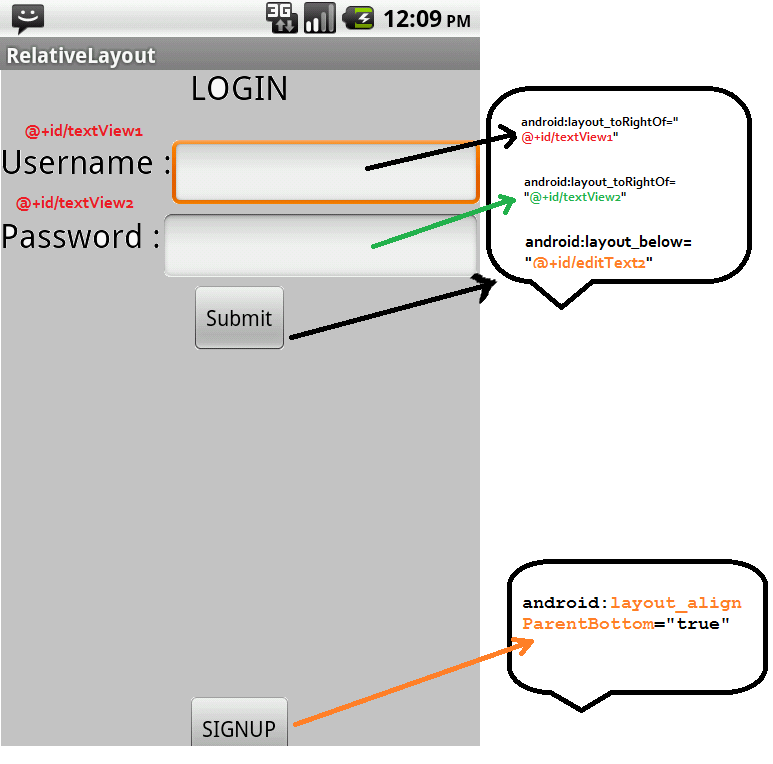
Example 1:
<RelativeLayout xmlns:android="http://schemas.android.com/apk/res/android"
            xmlns:tools="http://schemas.android.com/tools"
            android:layout_width="fill_parent"
            android:layout_height="fill_parent"
            tools:context=".RelativeLayoutAndroidExample" >

                    <TextView
                        android:id="@+id/text1"
                        android:layout_width="wrap_content"
                        android:layout_height="wrap_content"
                        android:layout_centerHorizontal="true"
                        android:layout_centerInParent="false"
                        android:text="LOGIN"
                        android:layout_marginTop="14dp"
                        android:textAppearance="?android:attr/textAppearanceLarge"
                        />

                     <TextView
                         android:id="@+id/textView1"
                         android:layout_width="wrap_content"
                         android:layout_height="wrap_content"
                         android:layout_below="@+id/text1"
                         android:layout_marginTop="20dp"
                         android:text="Username :"
                         android:textAppearance="?android:attr/textAppearanceLarge" />

                     <EditText
                         android:id="@+id/editText1"
                         android:layout_width="wrap_content"
                         android:layout_height="wrap_content"
                         android:layout_alignParentRight="true"
                         android:layout_alignTop="@+id/textView1"
                         android:layout_toRightOf="@+id/textView1"
                         />

                     <TextView
                         android:id="@+id/textView2"
                         android:layout_width="wrap_content"
                         android:layout_height="wrap_content"
                         android:layout_below="@+id/textView1"
                         android:layout_marginTop="20dp"

                         android:text="Password :"
                         android:textAppearance="?android:attr/textAppearanceLarge" />

                     <EditText
                         android:id="@+id/editText2"
                         android:layout_width="wrap_content"
                         android:layout_height="wrap_content"
                         android:layout_alignParentRight="true"
                         android:layout_alignTop="@+id/textView2"
                         android:layout_toRightOf="@+id/textView2"
                         android:inputType="textPassword"
                         />

                     <Button
                         android:id="@+id/btnSubmit"
                         android:layout_width="wrap_content"
                         android:layout_height="wrap_content"
                         android:layout_alignParentLeft="false"
                         android:layout_below="@+id/editText2"
                         android:layout_centerInParent="true"
                         android:text="Submit" />


                       <Button
                         android:layout_width="wrap_content"
                         android:layout_height="wrap_content"
                         android:layout_alignParentBottom="true"
                         android:text="SIGNUP"
                         android:layout_centerHorizontal="true"/>

        </RelativeLayout>
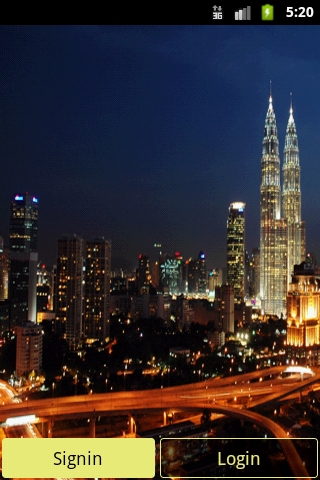
Example 2:
<?xml version="1.0" encoding="utf-8"?>
<selector xmlns:android="http://schemas.android.com/apk/res/android">

    <item android:state_pressed="true">
        <shape android:shape="rectangle">
            <corners android:radius="3dip" />

            <stroke android:width="1dip" android:color="#EFF07B" />

            <solid android:color="#90000000" />
        </shape>

        </item>
    <item>
        <shape android:shape="rectangle">
            <corners android:radius="3dip" />

            <stroke android:width="1dip" android:color="#EFF07B" />

            <solid android:color="#90000000" />
        </shape>

        </item>

</selector>
<?xml version="1.0" encoding="utf-8"?>
<selector xmlns:android="http://schemas.android.com/apk/res/android">

    <item android:state_pressed="true"><shape android:shape="rectangle">
            <corners android:radius="3dip" />

            <stroke android:width="1dip" android:color="#EFF07B" />

            <solid android:color="#EFF07B" />
        </shape></item>
    <item><shape android:shape="rectangle">
            <corners android:radius="3dip" />

            <stroke android:width="1dip" android:color="#EFF07B" />

            <solid android:color="#EFF07B" />
        </shape></item>

</selector>
<?xml version="1.0" encoding="utf-8"?>
<RelativeLayout xmlns:android="http://schemas.android.com/apk/res/android"
    android:layout_width="fill_parent"
    android:layout_height="fill_parent"
    android:background="@drawable/road" >

    <LinearLayout
        android:layout_width="match_parent"
        android:layout_height="wrap_content"
        android:padding="2dp"
        android:layout_alignParentBottom="true"
        android:orientation="horizontal" >

        <Button
            android:id="@+id/btnsignin"
            android:layout_width="match_parent"
            android:layout_height="wrap_content"
            android:layout_marginRight="5dp"
            android:layout_weight="1"
            android:background="@drawable/btn_signin_bg"
            android:padding="8dp"
            android:text="Signin"
            android:textColor="#000000"
            android:textSize="18sp" />

        <Button
            android:id="@+id/btnlogin"
            android:layout_width="match_parent"
            android:layout_height="wrap_content"
            android:layout_weight="1"
            android:background="@drawable/btn_login_bg"
            android:padding="8dp"
            android:text="Login"
            android:textColor="#EFF07B"
            android:textSize="18sp" />
    </LinearLayout>

</RelativeLayout>

Contributed By : Anu Radha