Introduction
Android Componets
UserInterface
Advanced UI
Data Storage
Advanced Concepts
Others
New Studio
- Android User Interface
- 3.1 Introduction(Nano)
- 3.2 Layouts(Nano)
- -- LinearLayout(Nano)
- -- RelativeLayout(Nano)
- -- TableLayout(Mega)
- -- Frame Layout(Mega)
- --
Absolute Layout - -- Grid Layout(Mega)
- 3.3 UI Widgets (Nano)
- -- TextView(Nano)
- -- EditText(Nano)
- -- Button(Nano)
- -- Event Handler(Nano)
- -- Image Buttons(Nano)
- -- CheckBox(Nano)
- -- Dialog(Nano)
- -- RadioGroup & RadioButtons(Nano)
- -- Toast(Nano)
- -- RatingBar(Nano)
- -- SeekBar(Nano)
- -- ProgerssBar(Nano)
- -- ToggleButton(Nano)
- -- WebView(Nano)
- -- Spinner(Nano)
- -- Layout Inflator(Mega)
- -- ListView and Adapters(Mega)
- -- Gridview(Mega)
- 3.4 Android Resources(Nano)
- -- Resource Introduction(Nano)
- -- Animation Resources(Mega)
- -- Color State List Resource(Mega)
- -- Drawable Resources(Mega)
- -- Layout Resource(Nano)
- -- String Resources(Nano)
- -- Style Resource(Mega)
- -- Supporting Multiple Screens(Mega)
- -- Practises
ToggleButton
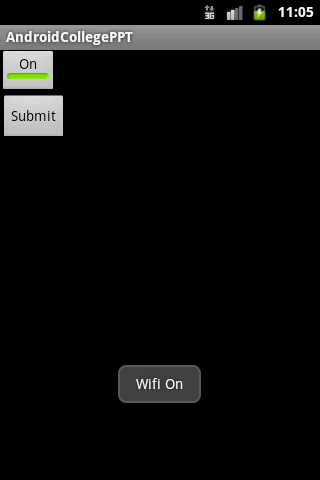
Android Toggle Button can be used to display checked/unchecked (On/Off) state on the button.android:textOff The text for the button when it is not checked.android:textOn The text for the button when it is checked.File :
a_toggle_button_demo.xml
<?xml version="1.0" encoding="utf-8"?>
<LinearLayout xmlns:android="http://schemas.android.com/apk/res/android"
    android:layout_width="match_parent"
    android:layout_height="match_parent"
    android:layout_margin="25dp"
    android:orientation="vertical" >

    <ToggleButton
        android:id="@+id/tb_wifi"
        android:layout_width="wrap_content"
        android:layout_height="wrap_content"
        android:checked="true"
        android:text="Wifi"
        android:textOff="Off"
        android:textOn="On"

/>

    <Button
        android:id="@+id/btn_submit"
        android:layout_width="wrap_content"
        android:layout_height="wrap_content"
        android:text="Submit" />

</LinearLayout>
File : A_ToggleDemo.java
package com.example.androidcollegeppt;

import android.app.Activity;
import android.os.Bundle;
import android.view.View;
import android.view.View.OnClickListener;
import android.widget.Button;
import android.widget.Toast;
import android.widget.ToggleButton;

public class A_ToggleDemo extends Activity{
	Button btn_submit;
	ToggleButton tb_wifi;
	@Override
	protected void onCreate(Bundle savedInstanceState) {

		super.onCreate(savedInstanceState);
		setContentView(R.layout.a_toggle_button_demo);
		btn_submit=(Button)findViewById(R.id.btn_submit);
		tb_wifi=(ToggleButton)findViewById(R.id.tb_wifi);

		btn_submit.setOnClickListener(new OnClickListener() {
			@Override
			public void onClick(View v) {
				if(tb_wifi.isChecked()){

				Toast.makeText(A_ToggleDemo.this, "Wifi On", Toast.LENGTH_SHORT).show();

				}else{

				Toast.makeText(A_ToggleDemo.this, "Wifi Off", Toast.LENGTH_SHORT).show();

				}
			}
		});

	}

}
OUTPUT