Introduction
Android Componets
UserInterface
Advanced UI
Data Storage
Advanced Concepts
Others
New Studio
- Android User Interface
- 3.1 Introduction(Nano)
- 3.2 Layouts(Nano)
- -- LinearLayout(Nano)
- -- RelativeLayout(Nano)
- -- TableLayout(Mega)
- -- Frame Layout(Mega)
- --
Absolute Layout - -- Grid Layout(Mega)
- 3.3 UI Widgets (Nano)
- -- TextView(Nano)
- -- EditText(Nano)
- -- Button(Nano)
- -- Event Handler(Nano)
- -- Image Buttons(Nano)
- -- CheckBox(Nano)
- -- Dialog(Nano)
- -- RadioGroup & RadioButtons(Nano)
- -- Toast(Nano)
- -- RatingBar(Nano)
- -- SeekBar(Nano)
- -- ProgerssBar(Nano)
- -- ToggleButton(Nano)
- -- WebView(Nano)
- -- Spinner(Nano)
- -- Layout Inflator(Mega)
- -- ListView and Adapters(Mega)
- -- Gridview(Mega)
- 3.4 Android Resources(Nano)
- -- Resource Introduction(Nano)
- -- Animation Resources(Mega)
- -- Color State List Resource(Mega)
- -- Drawable Resources(Mega)
- -- Layout Resource(Nano)
- -- String Resources(Nano)
- -- Style Resource(Mega)
- -- Supporting Multiple Screens(Mega)
- -- Practises
Android String Resources
A string resource provides text strings for your application with optional text styling and formatting.
There are three types of resources that can provide your application with strings:
| Type | Description |
|---|---|
| String | XML resource that provides a single string. |
| String Array | XML resource that provides an array of strings. |
| Quantity Strings (Plurals) | XML resource that carries different strings for pluralization. |
String
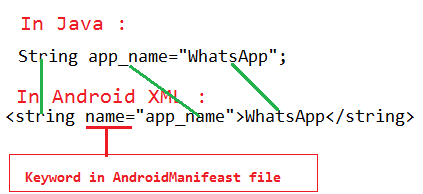
A string is a simple resource that is referenced using the value provided in the name attribute (not the name of the XML file). So, you can combine string resources with other simple resources in the one XML file, under one <resources> element.FILE LOCATION:
res/values/filename.xmlRESOURCE REFERENCE:
In Java:
R.string.string_nameIn XML:
@string/string_nameSYNTAX:
<?xml version="1.0" encoding="utf-8"?>
<resources>
    <string name="string_name">text_string</string>
</resources>
EXAMPLE:
XML file saved at res/values/strings.xml
<?xml version="1.0" encoding="utf-8"?>
<resources>
     <string name="app_name">WhatsApp</string>
</resources>
This layout XML applies a string to a View:
<TextView
    android:layout_width="fill_parent"
    android:layout_height="wrap_content"
    android:text="@string/app_name" />
This application code retrieves a string:
String string = getString(R.string.hello);
You can use either getString(int) or getText(int) to retrieve a string. getText(int) will retain any rich text styling applied to the string.
Escaping apostrophes and quotes
If you have an apostrophe (') in your string, you must either escape it with a backslash (\') or enclose the string in double-quotes ("").Examples :
<string name="good_example">This\'ll work</string>
<string name="good_example_2">"This'll also work"</string>
If you have a double-quote in your string, you must escape it (\")
<string name="good_example">This is a \"good string\".</string>
Formatting strings
If you need to format your strings usingString.format(String, Object...), then you can do so by putting your format arguments in the string resource.<string name="welcome_messages">Hello, %1$s! You have %2$d new messages.</string>In this example, the format string has two arguments: %1$s is a string and %2$d is a decimal number. You can format the string with arguments from your application like this:
Resources res = getResources();
String text = String.format(res.getString(R.string.welcome_messages), username, mailCount);