Introduction
Android Componets
UserInterface
Advanced UI
Data Storage
Advanced Concepts
Others
New Studio
- Android User Interface
- 3.1 Introduction(Nano)
- 3.2 Layouts(Nano)
- -- LinearLayout(Nano)
- -- RelativeLayout(Nano)
- -- TableLayout(Mega)
- -- Frame Layout(Mega)
- --
Absolute Layout - -- Grid Layout(Mega)
- 3.3 UI Widgets (Nano)
- -- TextView(Nano)
- -- EditText(Nano)
- -- Button(Nano)
- -- Event Handler(Nano)
- -- Image Buttons(Nano)
- -- CheckBox(Nano)
- -- Dialog(Nano)
- -- RadioGroup & RadioButtons(Nano)
- -- Toast(Nano)
- -- RatingBar(Nano)
- -- SeekBar(Nano)
- -- ProgerssBar(Nano)
- -- ToggleButton(Nano)
- -- WebView(Nano)
- -- Spinner(Nano)
- -- Layout Inflator(Mega)
- -- ListView and Adapters(Mega)
- -- Gridview(Mega)
- 3.4 Android Resources(Nano)
- -- Resource Introduction(Nano)
- -- Animation Resources(Mega)
- -- Color State List Resource(Mega)
- -- Drawable Resources(Mega)
- -- Layout Resource(Nano)
- -- String Resources(Nano)
- -- Style Resource(Mega)
- -- Supporting Multiple Screens(Mega)
- -- Practises
Android TextView Control
A TextView displays text to the user and optionally allows them to edit it.
Example :

Importent Methods
- getText()
- setText (CharSequence text)
TextView Attributes
| Attribute | Description |
|---|---|
| android:id | This is the ID which uniquely identifies the control. |
| android:text | Text to display. |
| android:textAllCaps | Present the text in ALL CAPS. Possible value either true or false. |
| android:textColor | Text color. May be a color value, in the form of #rgb, #argb, #rrggbb, or #aarrggbb. |
| android:textSize | Size of the text. Recommended dimension type for text is sp for scaled-pixels (example: 15sp). |
| android:textStyle | Style (bold, italic, bolditalic) for the text. You can use or more of the following values separated by '|'. |
| android:typeface | Typeface (normal, sans, serif, monospace) for the text. You can use or more of the following values separated by '|'. |
| android:padding | Space between the border and the actual view's content |
| android:layout_margin | Spaces outside the border |
| android:background | Apply background color to view |
| android:layout_gravity | sets the gravity of the View or Layout in its parent. |
| android:gravity | Sets the gravity of the content of the View its used on. |
| android:hint | -- |
| android:ems | -- |
Syntax :
<TextView
        android:id="@+id/tvRegistration"
        android:layout_width="wrap_content"
        android:layout_height="wrap_content"
        android:layout_gravity="center_horizontal"
        android:text="Registration"
        android:textColor="#FFF"
        android:textSize="18sp"
        android:textStyle="bold" />
Simple Textview
Result : 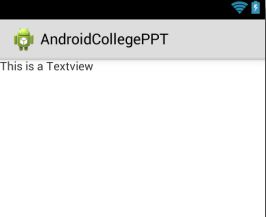
Step 1 : XML FileStep 2 : Java FileStep 1 : res/layout/textview_ex.xml
<?xml version="1.0" encoding="utf-8"?>
<LinearLayout xmlns:android="http://schemas.android.com/apk/res/android"
    android:layout_width="match_parent"
    android:layout_height="match_parent"
    android:orientation="vertical" >

    <TextView
        android:id="@+id/tv_title"
        android:layout_width="match_parent"
        android:layout_height="wrap_content"
        android:text="This is a Textview" />

</LinearLayout>
Step 2 : src/TextviewDemo.java
package com.example.androidcollegeppt;

import android.app.Activity;
import android.os.Bundle;
import android.widget.TextView;

public class TextviewDemo extends Activity{
	TextView tv_title;
	@Override
	protected void onCreate(Bundle savedInstanceState) {
		super.onCreate(savedInstanceState);
		setContentView(R.layout.textview_ex);
		tv_title=(TextView)findViewById(R.id.tv_title);

	}
}
Set Text to TextView in Java File
Result : 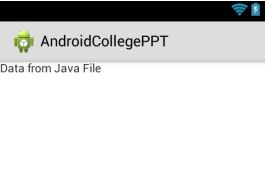
Step 1 : XML FileStep 2 : Java FileStep 1 : res/layout/textview_ex.xml
<?xml version="1.0" encoding="utf-8"?>
<LinearLayout xmlns:android="http://schemas.android.com/apk/res/android"
    android:layout_width="match_parent"
    android:layout_height="match_parent"
    android:orientation="vertical" >

    <TextView
        android:id="@+id/tv_title"
        android:layout_width="match_parent"
        android:layout_height="wrap_content"
        android:text="This is a Textview" />

</LinearLayout>
Step 2 : src/TextviewDemo.java
package com.example.androidcollegeppt;

import android.app.Activity;
import android.os.Bundle;
import android.widget.TextView;

public class TextviewDemo extends Activity{
	TextView tv_title;
	@Override
	protected void onCreate(Bundle savedInstanceState) {
		super.onCreate(savedInstanceState);
		setContentView(R.layout.textview_ex);
		tv_title=(TextView)findViewById(R.id.tv_title);
		tv_title.setText("Data from Java File");
	}
}
1. android:layout_width and android:layout_height
android:layout_width : Specifies the width of the view.Its values match_parent or wrap_content.android:layout_height : Specifies the height of the view.Its values match_parent or wrap_content.
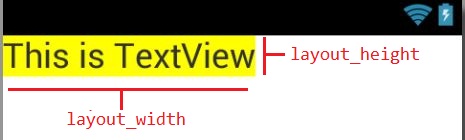
match_parent (vs) wrap_content
- fill_parent (renamed match_parent in API Level 8 and higher), which means that the border of the child view expands to match the border of the parent view.
- wrap_content, which means that the View wants to be just big enough to enclose its content .
<?xml version="1.0" encoding="utf-8"?>
<LinearLayout xmlns:android="http://schemas.android.com/apk/res/android"
    android:layout_width="match_parent"
    android:layout_height="match_parent"
    android:orientation="vertical" >

    <TextView
        android:layout_width="wrap_content"
        android:layout_height="wrap_content"
        android:text="This is Textview" />

</LinearLayout>
2. android:text : Apply text (content) to view.
Example : 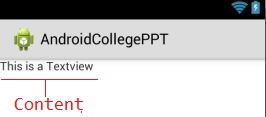
<?xml version="1.0" encoding="utf-8"?>
<LinearLayout xmlns:android="http://schemas.android.com/apk/res/android"
    android:layout_width="match_parent"
    android:layout_height="match_parent"
    android:orientation="vertical" >

    <TextView
        android:layout_width="wrap_content"
        android:layout_height="wrap_content"
        android:text="This is Textview" />

</LinearLayout>
3. android:android:id : Any View object may have an integer ID associated with it, to uniquely identify the View.
Example : 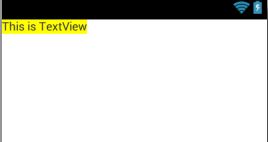
<?xml version="1.0" encoding="utf-8"?>
<LinearLayout xmlns:android="http://schemas.android.com/apk/res/android"
    android:layout_width="match_parent"
    android:layout_height="match_parent"
    android:orientation="vertical" >

    <TextView
        android:id="@+id/tv_title"
        android:layout_width="wrap_content"
        android:layout_height="wrap_content"
        android:text="This is TextView"
        />

</LinearLayout>
4. android:textColor : Apply text color to view#&39;s content.
<?xml version="1.0" encoding="utf-8"?>
<LinearLayout xmlns:android="http://schemas.android.com/apk/res/android"
    android:layout_width="match_parent"
    android:layout_height="match_parent"
    android:orientation="vertical" >

    <TextView
        android:id="@+id/tv_title"
        android:layout_width="wrap_content"
        android:layout_height="wrap_content"
        android:layout_margin="25dp"
        android:background="#FFFF00"
        android:padding="8dp"
        android:text="This is TextView"
        android:textColor="#000000"
        />

</LinearLayout>
5. android:textSize : Apply text size to view#&39;s content.
<?xml version="1.0" encoding="utf-8"?>
<LinearLayout xmlns:android="http://schemas.android.com/apk/res/android"
    android:layout_width="match_parent"
    android:layout_height="match_parent"
    android:orientation="vertical" >

    <TextView
        android:id="@+id/tv_title"
        android:layout_width="wrap_content"
        android:layout_height="wrap_content"
        android:layout_margin="25dp"
        android:background="#FFFF00"
        android:padding="8dp"
        android:text="This is TextView"
        android:textColor="#000000"
        android:textSize="18sp" />

</LinearLayout>
6. android:background : Apply Color / Image as background to view.
Result :
<?xml version="1.0" encoding="utf-8"?>
<LinearLayout xmlns:android="http://schemas.android.com/apk/res/android"
    android:layout_width="match_parent"
    android:layout_height="match_parent"
    android:orientation="vertical" >

    <TextView
        android:id="@+id/tv_title"
        android:layout_width="wrap_content"
        android:background="#FF0000"
        android:layout_height="wrap_content"
        android:text="This is TextView" />

</LinearLayout>
7. android:padding : Space around the view's content.
Result : 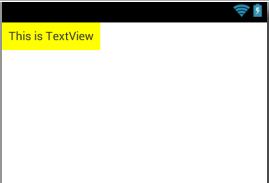
<?xml version="1.0" encoding="utf-8"?>
<LinearLayout xmlns:android="http://schemas.android.com/apk/res/android"
    android:layout_width="match_parent"
    android:layout_height="match_parent"
    android:orientation="vertical" >

    <TextView
        android:id="@+id/tv_title"
        android:layout_width="wrap_content"
        android:background="#FF0"
        android:padding="8dp"
        android:layout_height="wrap_content"
        android:text="This is TextView" />

</LinearLayout>
8. android:layout_margin : Space around border.
Result : 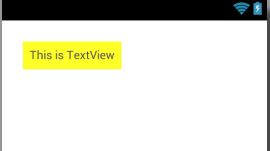
<?xml version="1.0" encoding="utf-8"?>
<LinearLayout xmlns:android="http://schemas.android.com/apk/res/android"
    android:layout_width="match_parent"
    android:layout_height="match_parent"
    android:orientation="vertical" >

    <TextView
        android:id="@+id/tv_title"
        android:layout_width="wrap_content"
        android:background="#FF0"
        android:padding="8dp"
        android:layout_margin="25dp"
        android:layout_height="wrap_content"
        android:text="This is TextView" />

</LinearLayout>
9. android:gravity : Sets the gravity of the content of the View its used on.
Result : 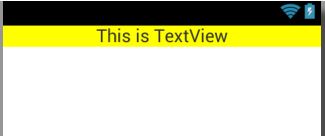
<?xml version="1.0" encoding="utf-8"?>
<LinearLayout xmlns:android="http://schemas.android.com/apk/res/android"
    android:layout_width="match_parent"
    android:layout_height="match_parent"
    android:orientation="vertical" >

    <TextView
        android:id="@+id/tv_title"
        android:layout_width="match_parent"
        android:layout_height="wrap_content"
        android:background="#FFFF00"
        android:gravity="center_horizontal"
        android:text="This is TextView" />

</LinearLayout>
10. android:layout_gravity : Sets the gravity of the View or Layout in its parent.
Result : 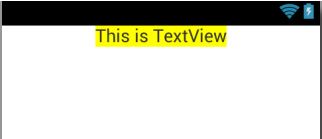
<?xml version="1.0" encoding="utf-8"?>
<LinearLayout xmlns:android="http://schemas.android.com/apk/res/android"
    android:layout_width="match_parent"
    android:layout_height="match_parent"
    android:orientation="vertical" >

    <TextView
        android:id="@+id/tv_title"
        android:layout_width="wrap_content"
        android:layout_height="wrap_content"
        android:layout_gravity="center_horizontal"
        android:background="#FFFF00"
        android:text="This is TextView" />

</LinearLayout>