Introduction
Android Componets
UserInterface
Advanced UI
Data Storage
Advanced Concepts
Others
New Studio
- Android User Interface
- 3.1 Introduction(Nano)
- 3.2 Layouts(Nano)
- -- LinearLayout(Nano)
- -- RelativeLayout(Nano)
- -- TableLayout(Mega)
- -- Frame Layout(Mega)
- --
Absolute Layout - -- Grid Layout(Mega)
- 3.3 UI Widgets (Nano)
- -- TextView(Nano)
- -- EditText(Nano)
- -- Button(Nano)
- -- Event Handler(Nano)
- -- Image Buttons(Nano)
- -- CheckBox(Nano)
- -- Dialog(Nano)
- -- RadioGroup & RadioButtons(Nano)
- -- Toast(Nano)
- -- RatingBar(Nano)
- -- SeekBar(Nano)
- -- ProgerssBar(Nano)
- -- ToggleButton(Nano)
- -- WebView(Nano)
- -- Spinner(Nano)
- -- Layout Inflator(Mega)
- -- ListView and Adapters(Mega)
- -- Gridview(Mega)
- 3.4 Android Resources(Nano)
- -- Resource Introduction(Nano)
- -- Animation Resources(Mega)
- -- Color State List Resource(Mega)
- -- Drawable Resources(Mega)
- -- Layout Resource(Nano)
- -- String Resources(Nano)
- -- Style Resource(Mega)
- -- Supporting Multiple Screens(Mega)
- -- Practises
Android Animation
Animation is the process of creating motion and shape change.
- Adding animations to your app interface will give high quality feel to your android applications.
- Animations can be performed through either XML or android code.
EXAMPLE :
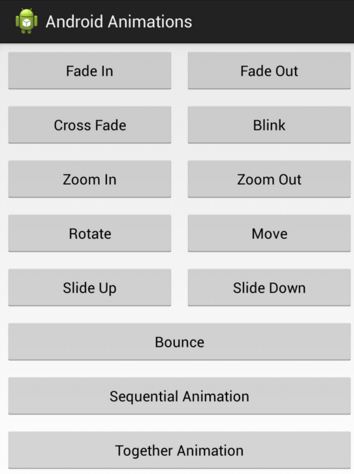
Basic steps to perform animation
Step 1: Create xml that defines the animation
Create an xml file which defines type of animation to perform. This file should be located underanim folder under res directory (res → anim → animation.xml).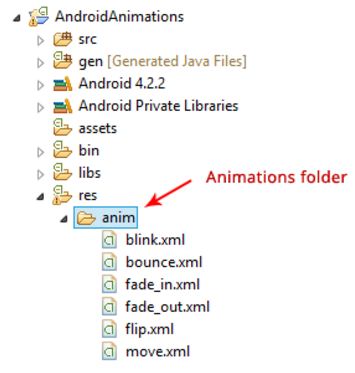
fade_in.xml
<?xml version="1.0" encoding="utf-8"?>
<set xmlns:android="http://schemas.android.com/apk/res/android"
    android:fillAfter="true" >

    <alpha
        android:duration="1000"
        android:fromAlpha="0.0"
        android:interpolator="@android:anim/accelerate_interpolator"
        android:toAlpha="1.0" />

</set>
Step 2: Load the animation
Next in your activity create an object ofAnimation class. And load the xml animation using AnimationUtils by calling loadAnimation function.FadeInActivity.java
public class FadeInActivity extends Activity{

    TextView txtMessage;

    // Animation
    Animation animFadein;

    @Override
    protected void onCreate(Bundle savedInstanceState) {
        super.onCreate(savedInstanceState);
        setContentView(R.layout.activity_fadein);

        txtMessage = (TextView) findViewById(R.id.txtMessage);

        // load the animation
        animFadein = AnimationUtils.loadAnimation(getApplicationContext(),
                R.anim.fade_in);
    }
}
Step 3: Set the animation listeners (Optional)
If you want to listen to animation events like start, end and repeat, your activity should implements AnimationListener. This step is optional. If you implement AnimationListener you will have to override following methods.onAnimationStart- This will be triggered once the animation startedonAnimationEnd- This will be triggered once the animation is overonAnimationRepeat- This will be triggered if the animation repeats
public class FadeInActivity extends Activity implements AnimationListener {
.
.
.
// set animation listener
animFadein.setAnimationListener(this);
.
.
.
// animation listeners
    @Override
    public void onAnimationEnd(Animation animation) {
        // Take any action after completing the animation
        // check for fade in animation
        if (animation == animFadein) {
            Toast.makeText(getApplicationContext(), "Animation Stopped",
                    Toast.LENGTH_SHORT).show();
        }

    }

    @Override
    public void onAnimationRepeat(Animation animation) {
        // Animation is repeating
    }

    @Override
    public void onAnimationStart(Animation animation) {
        // Animation started
    }
Step 4: Finally start the animation
You can start animation whenever you want by callingstartAnimation on any UI element by passing the type of animation. In this example i am calling fade in animation on TextView.
// start the animation
txtMessage.startAnimation(animFadein);
Complete Code
FadeInActivity.java
import android.app.Activity;
import android.os.Bundle;
import android.view.View;
import android.view.animation.Animation;
import android.view.animation.AnimationUtils;
import android.view.animation.Animation.AnimationListener;
import android.widget.Button;
import android.widget.TextView;
import android.widget.Toast;

public class FadeInActivity extends Activity implements AnimationListener {

    TextView txtMessage;
    Button btnStart;

    // Animation
    Animation animFadein;

    @Override
    protected void onCreate(Bundle savedInstanceState) {
        // TODO Auto-generated method stub
        super.onCreate(savedInstanceState);
        setContentView(R.layout.activity_fadein);

        txtMessage = (TextView) findViewById(R.id.txtMessage);
        btnStart = (Button) findViewById(R.id.btnStart);

        // load the animation
        animFadein = AnimationUtils.loadAnimation(getApplicationContext(),
                R.anim.fade_in);

        // set animation listener
        animFadein.setAnimationListener(this);

        // button click event
        btnStart.setOnClickListener(new View.OnClickListener() {

            @Override
            public void onClick(View v) {
                txtMessage.setVisibility(View.VISIBLE);

                // start the animation
                txtMessage.startAnimation(animFadein);
            }
        });

    }

    @Override
    public void onAnimationEnd(Animation animation) {
        // Take any action after completing the animation

        // check for fade in animation
        if (animation == animFadein) {
            Toast.makeText(getApplicationContext(), "Animation Stopped",
                    Toast.LENGTH_SHORT).show();
        }

    }

    @Override
    public void onAnimationRepeat(Animation animation) {
        // TODO Auto-generated method stub

    }

    @Override
    public void onAnimationStart(Animation animation) {
        // TODO Auto-generated method stub

    }

}
Important XML animation attributes
When working with animations it is better to have through knowledge about some of the important XML attributes which create major differentiation in animation behavior. Following are the important attributes you must known about.android:duration- Duration of the animation in which the animation should completeandroid:startOffset- It is the waiting time before an animation starts. This property is mainly used to perform multiple animations in a sequential manner.android:interpolator- It is the rate of change in animationandroid:fillAfter- This defines whether to apply the animation transformation after the animation completes or not. If it sets to false the element changes to its previous state after the animation. This attribute should be use with <set> nodeandroid:repeatMode- This is useful when you want your animation to be repeatandroid:repeatCount- This defines number of repetitions on animation. If you set this value to infinite then animation will repeat infinite times
Some useful animations
- Fade In
- Fade Out
- Cross Fading
- Blink
- Zoom In
- Zoom Out
- Rotate
- Move
- Slide Up
- Slide Down
- Bounce
- Sequential Animation
- Together Animation
<?xml version="1.0" encoding="utf-8"?>
<set xmlns:android="http://schemas.android.com/apk/res/android"
    android:fillAfter="true" >

    <alpha
        android:duration="1000"
        android:fromAlpha="0.0"
        android:interpolator="@android:anim/accelerate_interpolator"
        android:toAlpha="1.0" />

</set>
fade_out.xml
<?xml version="1.0" encoding="utf-8"?>
<set xmlns:android="http://schemas.android.com/apk/res/android"
    android:fillAfter="true" >

    <alpha
        android:duration="1000"
        android:fromAlpha="1.0"
        android:interpolator="@android:anim/accelerate_interpolator"
        android:toAlpha="0.0" />

</set>
blink.xml
<?xml version="1.0" encoding="utf-8"?>
<set xmlns:android="http://schemas.android.com/apk/res/android">
    <alpha android:fromAlpha="0.0"
        android:toAlpha="1.0"
        android:interpolator="@android:anim/accelerate_interpolator"
        android:duration="600"
        android:repeatMode="reverse"
        android:repeatCount="infinite"/>
</set>
zoom_in.xml
<?xml version="1.0" encoding="utf-8"?>
<set xmlns:android="http://schemas.android.com/apk/res/android"
    android:fillAfter="true" >

    <scale
        xmlns:android="http://schemas.android.com/apk/res/android"
        android:duration="1000"
        android:fromXScale="1"
        android:fromYScale="1"
        android:pivotX="50%"
        android:pivotY="50%"
        android:toXScale="3"
        android:toYScale="3" >
    </scale>

</set>
zoom_out.xml
<?xml version="1.0" encoding="utf-8"?>
<set xmlns:android="http://schemas.android.com/apk/res/android"
    android:fillAfter="true" >

    <scale
        xmlns:android="http://schemas.android.com/apk/res/android"
        android:duration="1000"
        android:fromXScale="1.0"
        android:fromYScale="1.0"
        android:pivotX="50%"
        android:pivotY="50%"
        android:toXScale="0.5"
        android:toYScale="0.5" >
    </scale>

</set>
rotate.xml
<?xml version="1.0" encoding="utf-8"?>
<set xmlns:android="http://schemas.android.com/apk/res/android">
    <rotate android:fromDegrees="0"
        android:toDegrees="360"
        android:pivotX="50%"
        android:pivotY="50%"
        android:duration="600"
        android:repeatMode="restart"
        android:repeatCount="infinite"
        android:interpolator="@android:anim/cycle_interpolator"/>

</set>
move.xml
<?xml version="1.0" encoding="utf-8"?>
<set
    xmlns:android="http://schemas.android.com/apk/res/android"
    android:interpolator="@android:anim/linear_interpolator"
    android:fillAfter="true">

   <translate
        android:fromXDelta="0%p"
        android:toXDelta="75%p"
        android:duration="800" />
</set>
slide_up.xml
<?xml version="1.0" encoding="utf-8"?>
<set xmlns:android="http://schemas.android.com/apk/res/android"
    android:fillAfter="true" >

    <scale
        android:duration="500"
        android:fromXScale="1.0"
        android:fromYScale="1.0"
        android:interpolator="@android:anim/linear_interpolator"
        android:toXScale="1.0"
        android:toYScale="0.0" />

</set>
slide_down.xml
<?xml version="1.0" encoding="utf-8"?>
<set xmlns:android="http://schemas.android.com/apk/res/android"
    android:fillAfter="true">

    <scale
        android:duration="500"
        android:fromXScale="1.0"
        android:fromYScale="0.0"
        android:interpolator="@android:anim/linear_interpolator"
        android:toXScale="1.0"
        android:toYScale="1.0" />

</set>
bounce.xml
<?xml version="1.0" encoding="utf-8"?>
<set xmlns:android="http://schemas.android.com/apk/res/android"
    android:fillAfter="true"
    android:interpolator="@android:anim/bounce_interpolator">

    <scale
        android:duration="500"
        android:fromXScale="1.0"
        android:fromYScale="0.0"
        android:toXScale="1.0"
        android:toYScale="1.0" />

</set>
sequential.xml
<?xml version="1.0" encoding="utf-8"?>
<set xmlns:android="http://schemas.android.com/apk/res/android"
    android:fillAfter="true"
    android:interpolator="@android:anim/linear_interpolator" >

    <!-- Use startOffset to give delay between animations -->


    <!-- Move -->
    <translate
        android:duration="800"
        android:fillAfter="true"
        android:fromXDelta="0%p"
        android:startOffset="300"
        android:toXDelta="75%p" />
    <translate
        android:duration="800"
        android:fillAfter="true"
        android:fromYDelta="0%p"
        android:startOffset="1100"
        android:toYDelta="70%p" />
    <translate
        android:duration="800"
        android:fillAfter="true"
        android:fromXDelta="0%p"
        android:startOffset="1900"
        android:toXDelta="-75%p" />
    <translate
        android:duration="800"
        android:fillAfter="true"
        android:fromYDelta="0%p"
        android:startOffset="2700"
        android:toYDelta="-70%p" />

    <!-- Rotate 360 degrees -->
    <rotate
        android:duration="1000"
        android:fromDegrees="0"
        android:interpolator="@android:anim/cycle_interpolator"
        android:pivotX="50%"
        android:pivotY="50%"
        android:startOffset="3800"
        android:repeatCount="infinite"
        android:repeatMode="restart"
        android:toDegrees="360" />

</set>
together.xml
<?xml version="1.0" encoding="utf-8"?>
<set xmlns:android="http://schemas.android.com/apk/res/android"
    android:fillAfter="true"
    android:interpolator="@android:anim/linear_interpolator" >

    <scale
        xmlns:android="http://schemas.android.com/apk/res/android"
        android:duration="4000"
        android:fromXScale="1"
        android:fromYScale="1"
        android:pivotX="50%"
        android:pivotY="50%"
        android:toXScale="4"
        android:toYScale="4" >
    </scale>

    <!-- Rotate 180 degrees -->
    <rotate
        android:duration="500"
        android:fromDegrees="0"
        android:pivotX="50%"
        android:pivotY="50%"
        android:repeatCount="infinite"
        android:repeatMode="restart"
        android:toDegrees="360" />

</set>