Introduction
Android Componets
UserInterface
Advanced UI
Data Storage
Advanced Concepts
Others
New Studio
- Android User Interface
- 3.1 Introduction(Nano)
- 3.2 Layouts(Nano)
- -- LinearLayout(Nano)
- -- RelativeLayout(Nano)
- -- TableLayout(Mega)
- -- Frame Layout(Mega)
- --
Absolute Layout - -- Grid Layout(Mega)
- 3.3 UI Widgets (Nano)
- -- TextView(Nano)
- -- EditText(Nano)
- -- Button(Nano)
- -- Event Handler(Nano)
- -- Image Buttons(Nano)
- -- CheckBox(Nano)
- -- Dialog(Nano)
- -- RadioGroup & RadioButtons(Nano)
- -- Toast(Nano)
- -- RatingBar(Nano)
- -- SeekBar(Nano)
- -- ProgerssBar(Nano)
- -- ToggleButton(Nano)
- -- WebView(Nano)
- -- Spinner(Nano)
- -- Layout Inflator(Mega)
- -- ListView and Adapters(Mega)
- -- Gridview(Mega)
- 3.4 Android Resources(Nano)
- -- Resource Introduction(Nano)
- -- Animation Resources(Mega)
- -- Color State List Resource(Mega)
- -- Drawable Resources(Mega)
- -- Layout Resource(Nano)
- -- String Resources(Nano)
- -- Style Resource(Mega)
- -- Supporting Multiple Screens(Mega)
- -- Practises
TableLayout
A TableLayout used to arrange views into rows and columns. You will use the <TableRow> element to create a row in the table.
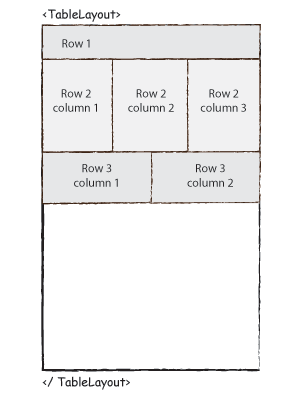
Syntax :
<TableLayout>

           <TableRow>
               .
               .
               .
               .
           </TableRow>

           <TableRow>
               .
               .
               .
               .
           </TableRow>

           <TableRow>
               .
               .
               .
               .
           </TableRow>

</TableLayout>
Ex : Login screen using TableLayout
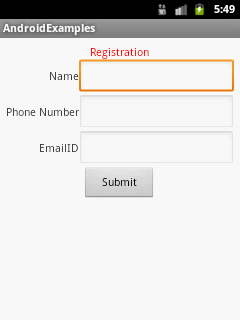
In .xml file
<?xml version="1.0" encoding="utf-8"?>
<TableLayout xmlns:android="http://schemas.android.com/apk/res/android"
    android:layout_width="match_parent"
    android:layout_height="match_parent"
    android:padding="8dp"
    android:stretchColumns="2" >

    <TableRow
        android:layout_width="match_parent"
        android:layout_height="wrap_content"
        android:gravity="center_horizontal" >

        <TextView
            android:layout_width="wrap_content"
            android:layout_height="wrap_content"
            android:layout_span="2"
            android:gravity="center"
            android:text="Registration"
            android:textColor="#F00" />
    </TableRow>

    <TableRow
        android:layout_width="match_parent"
        android:layout_height="wrap_content" >

        <TextView
            android:id="@+id/tv"
            android:layout_width="wrap_content"
            android:layout_height="wrap_content"
            android:layout_column="1"
            android:gravity="right"
            android:text="Name" />

        <EditText
            android:id="@+id/etName"
            android:layout_width="wrap_content"
            android:layout_height="wrap_content"
            android:layout_column="2" />
    </TableRow>

    <TableRow
        android:layout_width="match_parent"
        android:layout_height="wrap_content" >

        <TextView
            android:id="@+id/tvPhoneNumber"
            android:layout_width="wrap_content"
            android:layout_height="wrap_content"
            android:layout_column="1"
            android:gravity="right"
            android:text="Phone Number" />

        <EditText
            android:id="@+id/etPhoneNumber"
            android:layout_width="wrap_content"
            android:layout_height="wrap_content"
            android:layout_column="2" />
    </TableRow>

    <TableRow
        android:layout_width="match_parent"
        android:layout_height="wrap_content" >

        <TextView
            android:layout_width="wrap_content"
            android:layout_height="wrap_content"
            android:layout_column="1"
            android:gravity="right"
            android:text="EmailID" />

        <EditText
            android:id="@+id/etEmailID"
            android:layout_width="wrap_content"
            android:layout_height="wrap_content"
            android:layout_column="2" />
    </TableRow>

    <TableRow
        android:layout_width="match_parent"
        android:layout_height="wrap_content"
        android:gravity="center_horizontal" >

        <Button
            android:id="@+id/textView6"
            android:layout_width="100dp"
            android:layout_height="45dp"
            android:layout_span="2"
            android:text="Submit" />
    </TableRow>


</TableLayout>